SEO Ranking API: How to Pull Keyword Position Data
Google doesn’t publish an SEO ranking API. There is no official endpoint that answers “where does my page sit for this keyword right now.” What exists are two legal sources, and they measure different things.
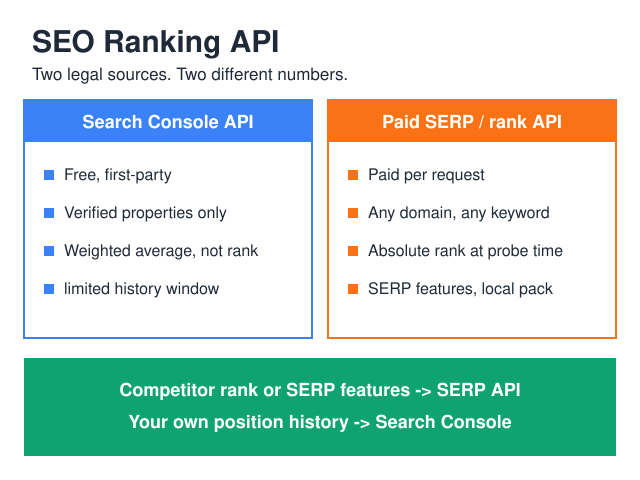
The first is the Search Console Search Analytics API. Free, first-party, limited to properties you verify. Its position field is an average weighted by impressions — not a rank check — and its history reaches back only as far as the rolling window Search Console keeps.
The second is a commercial SERP or rank-tracking API. Absolute position, any domain, on demand, for money.
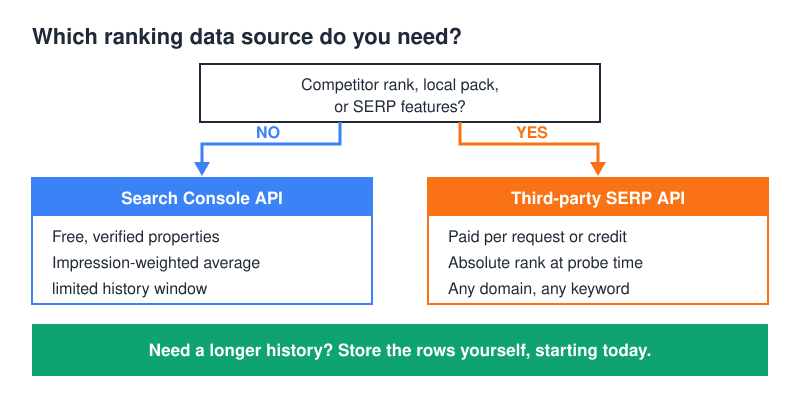
The rule fits one line: need a competitor’s rank or SERP features, buy a SERP API; need your own position history, use Search Console.
And expect the two numbers to disagree. A query showing average position 12.4 in Search Console may never have physically sat on result 12.
Why is there no official Google ranking API?
Two reasons, and only one of them is legal.
The legal one: Google’s terms bar “using automated means to access content from any of our services in violation of the machine-readable instructions on our web pages.” Anyone selling you “live Google rankings” is either carrying that exposure themselves or buying from someone who does. That doesn’t make SERP APIs unusable — it makes the exposure a line item in your vendor’s business model, not yours. Read the Google Terms of Service before you build scraping into your own stack.
The technical one: there is no single rank to return. Results shift by location, device, language, personalization, and the SERP layout of the moment. “Position 7” is a snapshot of one probe from one place at one time.
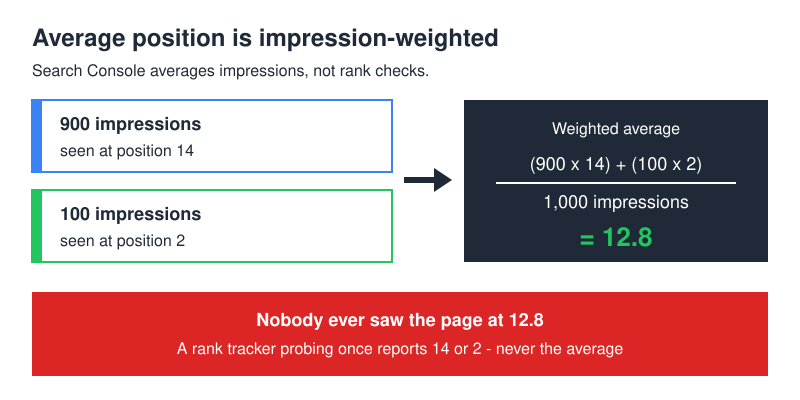
This is exactly why Search Console reports an average. Google computes it across impressions, not across rank checks. If a page appeared 900 times at position 14 and 100 times at position 2, the average lands near 12.8 — a number the page never actually held. I’ve had to explain that gap in more client calls than I’d like, usually after someone built a dashboard on position and compared it to a rank tracker. Google’s own definition matches: a position is recorded only when a link earns an impression, and the figure you see is the topmost position occupied by a link to your property, averaged across queries — see what impressions, position and clicks mean.
What does the Search Console API actually return?
One method does the work: searchanalytics.query. You POST a date range, a list of dimensions, and a row limit; you get back rows of metrics.
Available dimensions are query, page, country, device, date, hour, and searchAppearance. Metrics come back as clicks, impressions, ctr, and position. Group by more dimensions and you get finer rows — and more of them.
curl -s -X POST \
 "https://www.googleapis.com/webmasters/v3/sites/sc-domain%3Aexample.com/searchAnalytics/query" \
 -H "Authorization: Bearer $ACCESS_TOKEN" \
 -H "Content-Type: application/json" \
 -d '{
 "startDate": "2026-07-01",
 "endDate": "2026-07-01",
 "dimensions": ["query", "page"],
 "rowLimit": 25000,
 "startRow": 0
 }'
Same call in Python, with a service account and day-level paging:
from google.oauth2 import service_account
from googleapiclient.discovery import build

SITE = "sc-domain:example.com"

creds = service_account.Credentials.from_service_account_file(
 "sa.json",
 scopes=["https://www.googleapis.com/auth/webmasters.readonly"],
)
sc = build("searchconsole", "v1", credentials=creds)

def fetch_day(day, row_limit=25000):
 rows, start = [], 0
 while True:
 resp = sc.searchanalytics().query(
 siteUrl=SITE,
 body={
 "startDate": day,
 "endDate": day,
 "dimensions": ["query", "page", "country", "device"],
 "rowLimit": row_limit,
 "startRow": start,
 },
 ).execute()
 batch = resp.get("rows", [])
 rows.extend(batch)
 if len(batch) < row_limit:
 break
 start += row_limit
 return rows
On auth: OAuth is for tools acting on behalf of a human who owns the property. A service account is for a pipeline that runs unattended — create it, then add its email as a user on the Search Console property. For a scheduler, the service account wins every time; nothing expires at 3 a.m. because someone revoked a consent screen. If the trade-offs are new to you, our breakdown of analytics API authentication covers both flows.
Quotas, row limits, and retention
Two published ceilings shape the design of any pipeline built on this API, plus one property of the data that isn’t a ceiling at all. Check each against Google’s own documentation before you size a job, not after your backfill comes back suspiciously small.
Rows per call. The rowLimit parameter defaults to 1,000 and tops out at 25,000 per request — both figures sit in the searchanalytics.query reference. You get past the ceiling with startRow paging, not by asking for a bigger number. That default is worth staring at: leave it alone and a job you believed was exhaustive quietly wasn’t.
Calls per site. The URL Inspection endpoint that lives in the same API is capped at 2,000 queries per day and 600 per minute per site, per the Search Console API limits page. It answers a different question — indexing status, not position — but teams wire it into ranking dashboards, hit the daily cap on a mid-size property, and then blame the ranking job for the errors.
Retention. Not forever. Search Console’s performance data is a rolling window — the current length is the one stated in the Console’s own help — and the day a row falls out of that window, it’s gone from Google’s side permanently. That property, not any particular number of months, is the whole argument for building a history table: the API isn’t an archive.
Those are the ceilings that matter for a ranking job. The rest of the interface, from the OAuth scopes to the paging rules and the privacy floor that keeps grouped totals from reconciling, is covered in the full Search Console API guide.
Search Console, a paid SEO ranking API, or your own scraper?
| Search Console Search Analytics API | Third-party SERP / rank API | Your own SERP scraper | |
|---|---|---|---|
| What “position” means | Impression-weighted average of your top result | Absolute rank at probe time | Absolute rank at probe time |
| Coverage | Verified properties only | Any domain, any keyword | Any domain, any keyword |
| Cost | Free | Per request or per credit | Proxies, captcha solving, maintenance |
| Update frequency | Daily rows, on Google’s schedule | On demand, as often as you pay for | On demand |
| History | A rolling window, then it’s gone | Whatever you store | Whatever you store |
| ToS risk | None — it’s a sanctioned API | Carried by the vendor | Carried by you |
| Auth model | OAuth or service account | API key or basic auth | None (and that’s the problem) |
| Data freshness | Trails real time; recent rows keep changing | Minutes | Minutes |
Writing your own scraper is the option that looks cheapest on a whiteboard and is the most expensive to keep alive: proxies rot, layouts change, and someone has to own it for as long as it runs.
How do you build a position history table?
Search Console keeps a rolling window. If you want multi-year trends, you store the rows yourself, starting today.
create table position_history (
 date date not null,
 query text not null,
 page text not null,
 country text not null,
 device text not null,
 position numeric(6,2) not null,
 impressions integer not null,
 clicks integer not null,
 primary key (date, query, page, country, device)
);
Pull impressions alongside position — always. Without it you can’t roll daily rows up into a weekly or monthly figure. Averaging averages is wrong; the correct aggregate is sum(position * impressions) / sum(impressions), and that formula needs the impression counts sitting next to each position.
Make the write idempotent so re-running a day is harmless:
insert into position_history
 (date, query, page, country, device, position, impressions, clicks)
values (...)
on conflict (date, query, page, country, device) do update
 set position = excluded.position,
 impressions = excluded.impressions,
 clicks = excluded.clicks;
Then schedule one job per day, fetching a day at a time, and re-fetch the last several days on every run — Search Console keeps adjusting recent data after first publishing it. A separate backfill mode that walks a date list and skips days already present will close gaps after outages. Same shape as any other pull-transform-store job; the SEO reporting API workflow guide covers the surrounding plumbing.
What breaks in production
Row limit applies to the whole date range, not to each day. This is the one that silently ruins history. Request 40 days in a single call with a modest rowLimit and the API returns that many rows total — a handful per day — and nothing errors. Your chart renders. It’s garbage.
I found this on a real backfill: one property returned 639 rows for a 40-day window with the script’s default limit. Refetching the same window day by day, with paging, produced 35,497 rows. Same API, same property, same dates. The fix is two rules — one request per day, and page with startRow until a batch comes back shorter than your limit.
Three more that cost me time:
- Anonymized queries. Google’s performance tables omit rare queries to protect user privacy. Those searches still generate clicks and impressions on the page, so a query-level export will never reconcile with a page-level one, and it shouldn’t.
- Average position drifts when you publish. Add pages that rank at 40 and the site-level average worsens while every existing page holds. Track position per query and page, never site-wide.
- Time zone. The Performance report labels each day by local time in California, not by yours. Don’t join it to a database whose days end at local midnight without accounting for the offset.
How do you report position without fooling yourself?
Storing the rows is the easy half. Turning them into a number someone can act on is where reporting usually goes wrong, and four habits prevent most of it.
Segment before you average. One figure covering mobile and desktop, a dozen countries and every query on the property describes nothing at all. Position is only comparable inside a fixed slice: one query, one page, one country, one device. Widen the slice and you’re measuring your own traffic mix, not Google’s opinion of the page.
Show position next to impressions and clicks. A move from 8.4 to 6.1 on a query nobody searches is noise dressed up as progress. If impressions didn’t move and clicks didn’t move, the position change didn’t matter — better to say so in the report than to have a stakeholder work it out three slides later.
Read a missing keyword carefully. Because rare queries are anonymized out of the query dimension, the visible keyword set shifts from week to week on its own. A “lost” keyword is often a keyword that dropped under that reporting threshold, not one that dropped out of the index. Check impressions on the page before you open a rescue ticket — I’ve watched a team spend a sprint rewriting a page that had never lost a thing.
Prefer a distribution to a point estimate. Once you’re keeping daily rows, you can answer questions the raw average can’t. “On page one for 22 of the last 30 days” tells a client something real; “average position 9.7” invites an argument about whether 9.7 is good. Same data, better sentence.
When do you actually need a paid SEO ranking API?
Four cases, in my experience, and only four. A paid SEO ranking API earns its line on the invoice when:
- You need a competitor’s positions — Search Console will never give you those.
- You need local pack or map-pack results.
- You need SERP features: who owns the featured snippet, what’s in People Also Ask, how far down the organic block starts.
- A client contract specifies absolute rank, and “impression-weighted average” isn’t an acceptable answer.
If none of those apply, Search Console covers it for free.
One more thing paid suites bundle with rankings is link data — if you’re paying for one anyway, check whether the same subscription lets you pull backlink data via API; that often decides the vendor.
When you do buy, three habits keep the bill sane. Track head terms only — nobody makes decisions from position 78 on a long-tail phrase. Run weekly instead of daily; rankings rarely move enough in 24 hours to change what you’d do. And cache responses locally so a dashboard reload doesn’t re-bill you for data you already have. Positions are also just one family of what the broader SEO data APIs sell — keyword metrics, backlinks, audits and AI-visibility data ride on the same credit and per-request billing, and that overview sorts them by source and price model. For a wider look at the ecosystem, see our SEO API guide.
FAQ
What is an SEO ranking API?
It’s shorthand for any API that returns keyword position data, and in practice it covers two very different products. One is Google’s own Search Console Search Analytics API, which reports an impression-weighted average position for properties you’ve verified. The other is a commercial SERP API, which probes live results and returns an absolute rank for any domain you name. The phrase gets used for both, which is why so many dashboards compare numbers that were never comparable.
Does Google have an official rank tracking API?
No. Google offers no API that returns a page’s live position in search results. The closest sanctioned source is the Search Console Search Analytics API, which reports an impression-weighted average position for properties you own.
Why does Search Console say 12.4 when my rank tracker says 7?
They measure different things. The rank tracker probed one location, one device, one moment. Search Console averaged every impression across countries, devices and days — including the ones where you ranked far lower. Both numbers can be correct at once.
Can I track competitors through the Search Console API?
No. The API only returns data for properties you’ve verified ownership of. Competitor positions require a third-party SERP API.
How far back does Search Console data go?
Not indefinitely. Performance data is a rolling window whose current length is the one stated in Search Console’s own help, and the API mirrors that window rather than archiving anything behind it. Older rows leave for good, which is why a history table is worth starting before you think you need one — the data you didn’t save is the data you can’t buy back.
How often can I call the Search Console API?
Google publishes ceilings rather than a single rate. Search Analytics is bounded by rows per request — 25,000 is the documented maximum and 1,000 the default. The URL Inspection endpoint alongside it is bounded by calls, at 2,000 per day and 600 per minute per site. A once-daily job that fetches one day per request and pages through it stays comfortably inside both; a loop hammering every keyword does not.
OAuth or service account — which should I use?
Service account for anything scheduled. Grant its email access to the property in Search Console and the job runs unattended. Use OAuth when a human is signing in to a tool with their own Google account, and store the refresh token encrypted.
Where to start
Create the table, wire a service account, and schedule one call per day with paging. Two weeks of correctly stored rows beat two years of a rank tracker you can’t query — and you’ll finally have a defensible answer when the two numbers disagree.
// Alicia Bennett
Lead Web Analyst based in Toronto with 12+ years in digital analytics — privacy-first tracking, open-source tools, and the analytics API layer that sits under every dashboard.
More about the author →