Google Search Console API: Auth, Quotas, and Totals That Never Match
The Google Search Console API is free, and it is the only place your own search data exists. No paid tool can sell you your real impressions or your real average position, because Google hands those to the property owner and to nobody else.
It is also the API most likely to break quietly. In twelve years of wiring analytics platforms together, almost none of my Search Console failures came from writing the request. They came from a token that expires on a schedule, a row ceiling that truncates without raising an error, and totals that refuse to equal the sum of their parts.
Here is the map of all three, plus the boundaries nobody warns you about. Every number below comes from Google’s own documentation, read on 28 September 2026.
What the Search Console API is made of
The API is four resources, not one, and they have almost nothing in common except the property they point at.
Search Analytics is the one everybody means. You send a date range, a list of dimensions to group by, and you get back clicks, impressions, click-through rate and average position. URL Inspection answers a different question: the indexed state of a single URL. Sitemaps lists, reads and submits sitemap files. Sites manages the properties attached to your account.
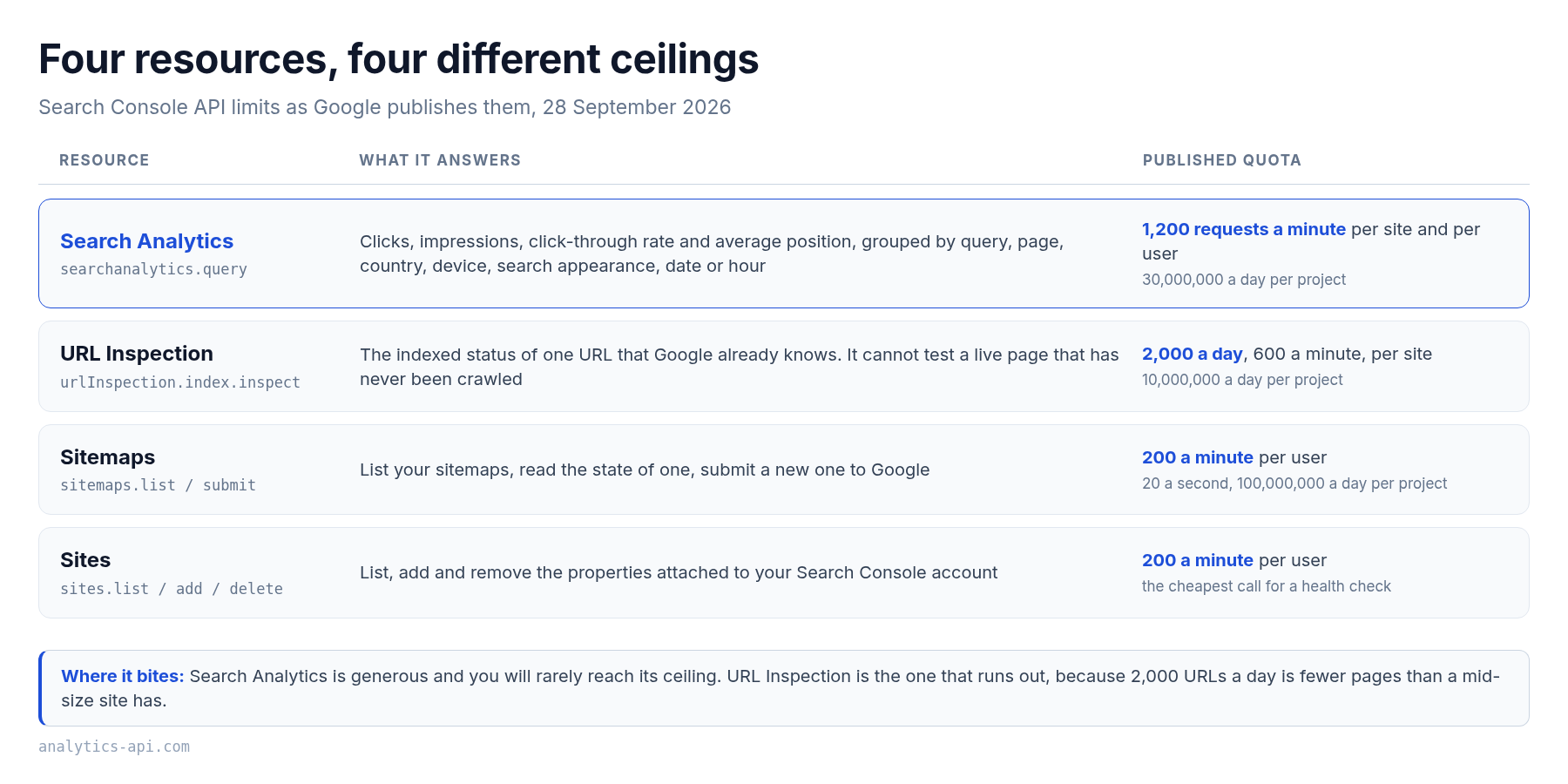
That split matters more than it looks. Teams wire URL Inspection into a dashboard next to their performance charts, hit its much smaller daily cap on a mid-size site, and then spend an afternoon blaming the performance job for the errors.
OAuth is the only door
There is no API key path to your own data. Google’s authorization guide says it in one line: “Your application must use OAuth 2.0 to authorize requests. No other authorization protocols are supported.”
You pick one of two scopes. https://www.googleapis.com/auth/webmasters.readonly gives read-only access and is what a reporting pipeline needs. https://www.googleapis.com/auth/webmasters adds write access, which you only want if the job submits sitemaps or manages properties. Ask for the narrow one by default.
One thing here trips people up constantly. Google also publishes a Search Console Testing Tools API, a separate product for checking mobile usability and rich results on any public URL, and that one does take a key rather than an OAuth token.
Finding that page first and concluding that a key will work for performance data costs an hour. It won’t. Different product, different data. For the wider picture of how platforms differ here, our guide to analytics API authentication lays the four patterns side by side.
The refresh token that dies on a schedule
Here is the failure that catches nearly every first integration. You build the OAuth flow, store the refresh token, watch the nightly job run beautifully, and exactly a week later everything returns invalid_grant.
The cause is not your code. It is the publishing status of your consent screen. Google’s OAuth documentation is explicit: “A Google Cloud Platform project with an OAuth consent screen configured for an external user type and a publishing status of ‘Testing’ is issued a refresh token expiring in 7 days, unless the only OAuth scopes requested are a subset of name, email address, and user profile.”
Read that twice if you have ever re-authorized a pipeline every Monday without knowing why. The fix is to move the consent screen out of Testing, not to add a retry.
Two more expiry rules are worth pinning to the wall. A refresh token dies if it has not been used for six months, which quietly kills any job you pause over a slow quarter.
The second is a ceiling on live tokens: “There is currently a limit of 100 refresh tokens per Google Account per OAuth 2.0 client ID. If the limit is reached, creating a new refresh token automatically invalidates the oldest refresh token without warning.” Re-run your auth flow in a loop while debugging and you can evict the token your production job is using.
The lesson that cost me the most: a stored token is not a working grant. On one pipeline the grant died and nobody noticed for three weeks, because the health check reported “connected” from the presence of a row in the database rather than from a real call.
Any status that claims a connection has to prove it. A sites.list request is the cheapest proof there is, and it exercises both the token and the scope at once.
The quotas you will actually hit
Google publishes the limits on one page, and they differ by resource rather than by plan, because there is no plan.
| Resource | Per site | Per user | Per project |
|---|---|---|---|
| Search Analytics | 1,200 queries per minute | 1,200 queries per minute | 30,000,000 per day and 40,000 per minute |
| URL Inspection | 2,000 per day and 600 per minute | Not published separately | 10,000,000 per day and 15,000 per minute |
| Every other method | Not published separately | 20 per second and 200 per minute | 100,000,000 per day |
Two readings of that table change how you build. First, the performance endpoint is generous enough that throughput will almost never be your problem, which is unusual for a free API. Second, the daily cap on URL Inspection is the real constraint: 2,000 URLs a day is fewer pages than a mid-size publisher has, so an index-coverage job has to be a rolling sample rather than a full sweep.
Your current consumption sits in the quota tab of your project in the Google APIs Console, and it is worth looking at once before you size a backfill rather than after it fails.
Rows, paging, and the ceiling that raises no error
The rowLimit parameter is documented as “[Optional; Valid range is 1–25,000; Default is 1,000]”. That default is the trap. Leave it alone, ask for a month of query data on a busy property, and you will get exactly 1,000 tidy rows back with a 200 status and no warning at all that the rest exists.
Paging works through startRow, a zero-based offset you advance by the size of the page you just read. The stop condition is documented and pleasantly boring: “If startRow exceeds the number of results for the query, the response will be a successful response with zero rows.” So you loop until a page comes back shorter than you asked for, or empty.
In practice, three habits keep this honest. Set rowLimit explicitly on every call so the number is visible in your code. Log how many rows each page returned. And alert when a daily pull lands on a suspiciously round number, because 1,000 rows almost never occurs naturally.
Why your totals never match
This is the part that generates support tickets, and it is not a bug. Google withholds rare rows on purpose. The Search Console help puts the reason plainly: “To protect user privacy, the Performance report does not show all data. For example, it omits some queries that are searched a very small number of times.”
The consequence is stated just as plainly: “anonymized (rare) results are omitted from the table, but are included in the chart totals.” Your unfiltered total counts those impressions. The moment you group by query, the rows behind them disappear.
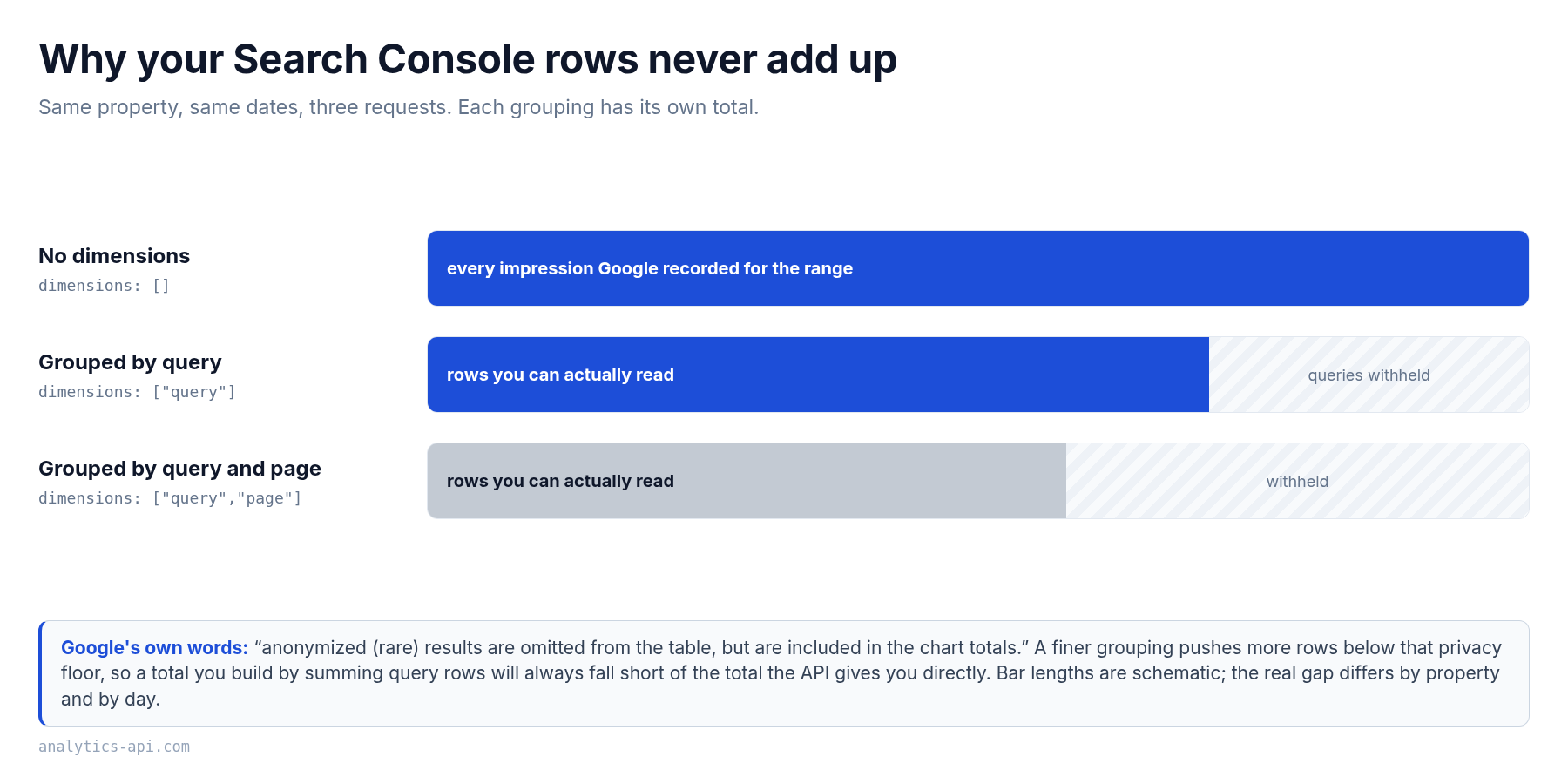
Grouping is not the only thing that moves the number. Google notes that “when you add a page or Search appearance filter, the chart and table data are aggregated differently”, which is why a filtered view rarely reconciles with an unfiltered one either.
So the design rule is simple: request the grouping you intend to report, and never derive one grouping from another. Our own nightly job makes four separate calls per property for this reason, one for daily totals, one grouped by query, one by page, and one by query and page together.
That feels wasteful right up until somebody asks why the dashboard total sits above the sum of the keyword table. The answer is a documented privacy rule rather than a broken join, and having the two numbers come from two honest requests is what lets you say so.
Fresh data, final data, and the window that closes
Search Console data arrives late. Google’s help states the normal case: “Collected data is usually available in 2–3 days.” The newest rows may also be preliminary, which means they can still change in the hours after you read them.
The dataState parameter decides which version you get. Omit it, or send final, and you get only finalized data. Send all and the response includes fresh data that has not settled. Both are legitimate, and picking the wrong one is how a chart gains a cliff at its right edge: pull with all today, pull again tomorrow, and yesterday’s numbers will have moved.
My rule after years of this is to store finalized data and re-pull a trailing window every night rather than appending yesterday alone. Our job re-reads the last seven days daily and upserts, which absorbs both the two-day lag and any revision Google makes inside it. The integration guide covers the cadence and storage side of that in more depth.
One more property shapes the whole design. Search Console performance data is a rolling window, not an archive. Check the current length in Google’s own help before you size a backfill, and build a history table regardless, because the day a row falls out of that window the API can no longer give it to you.
What this API will never give you
It is worth being blunt about the boundaries, because half the disappointment with this API comes from expecting a competitor research tool.
- Anyone else’s data. The API reaches only properties you have verified in your own account. There is no competitor view and no way to buy one.
- Search volume. You get your impressions, which is how often your pages were shown. That is a different number from how often a phrase is searched, and the two should never be used interchangeably.
- An absolute rank. Average position is an average over the impressions inside your range, which mixes devices, countries and result types unless you filter them. A rank tracker measures something narrower, which is why the two disagree and why our ranking API guide treats them as separate metrics.
- A live indexability test. The URL Inspection API is explicit: “Presently only the status of the version in the Google index is available; you cannot test the indexability of a live URL.”
- Push delivery. The API reference lists no webhook or streaming method, so everything here is polling on a schedule you choose.
If your requirement is genuinely about other people’s sites, you are shopping in a different aisle, and our comparison of nine SEO API providers maps which ones sell what.
A pull that survives production
- Publish the consent screen before you build anything on top of the token. Testing status is a seven-day fuse.
- Ask for the read-only scope unless the job writes. Fewer permissions, fewer ways to be surprised.
- Prove the connection with a real call. A stored token means nothing until
sites.listanswers. - Set
rowLimitexplicitly and page withstartRowuntil a short page arrives. Never trust a default you did not type. - Make one request per grouping you report. Derived totals will not reconcile, and the reason is privacy, not arithmetic.
- Store finalized data and re-pull a trailing window. A week is a comfortable margin over the usual two-day to three-day lag.
- Keep your own history table. The API is a window, not an archive, and the window moves every day.
Frequently Asked Questions
Is the Google Search Console API free?
Yes. Google publishes no price and no billing unit for it, only quotas. That makes it the cheapest reliable source of search performance data you will find, with the single condition that it covers your own verified properties and nothing else.
Can I use an API key instead of OAuth?
Not for your site’s performance data. The authorization guide states that OAuth 2.0 is the only supported protocol. The separate Search Console Testing Tools API does use a key, which is the source of most of the confusion on this point.
Why does my refresh token keep expiring after seven days?
Because the OAuth consent screen is still in Testing status. Google issues a seven-day refresh token to external-user-type projects in that state. Moving the consent screen to published resolves it, and no amount of retry logic will.
Why don’t my API numbers match the Search Console interface?
Most often because you are comparing two different groupings. Rare queries are withheld from row-level results to protect user privacy but still counted in the unfiltered total, so a sum of query rows is always smaller. Adding a page or search appearance filter changes the aggregation as well.
How many rows can one request return?
Up to 25,000, with a default of 1,000 if you do not set rowLimit yourself. Larger result sets come through startRow paging rather than a bigger limit, and a response with zero rows is the documented signal that you have reached the end.
How fresh is the data?
Collected data is usually available in two to three days, and the newest rows can still be preliminary. Use dataState: final for anything you store, and treat fresh data as a preview rather than a record.
Keep Reading
- Analytics API authentication gives the four auth patterns you will meet across platforms, not just Google’s
- SEO ranking APIs explains why average position and a tracked rank are different numbers
- SEO API integration covers cadence, storage and delivery once the data is flowing
- What is a web analytics API places this one inside the wider family
Sources, all read on 28 September 2026: authorizing requests, Google OAuth 2.0 documentation, Search Console API usage limits, the searchanalytics.query reference and Google’s note on data discrepancies.
// Alicia Bennett
Lead Web Analyst based in Toronto with 12+ years in digital analytics — privacy-first tracking, open-source tools, and the analytics API layer that sits under every dashboard.
More about the author →