SEO API Integration: Getting Search Data Into Your Stack
There is a gap between “we have API access” and “the data shows up where decisions get made” — and most SEO API subscriptions die in that gap. SEO API integration is the unglamorous middle layer: authentication, scheduling, rate limits, storage, and the handoff into whatever your team actually looks at. When I help teams migrate to privacy-first analytics stacks, the SEO data pipeline is usually the piece that was held together with one person’s laptop and a forgotten cron job. This guide is the checklist I wish they had started from.
It belongs to our SEO API guide series: the pillar explains what the APIs return, and the companion piece on building an SEO reporting workflow walks one concrete pipeline end to end. This article is the map above both — where SEO data can land, and what each landing spot costs to maintain. If you are still deciding which data APIs to plug in, the guide to SEO data API types and pricing sorts the market by data family and billing model first.
The Four Places SEO Data Lands
Strip away vendor language and integration targets come down to four destinations:
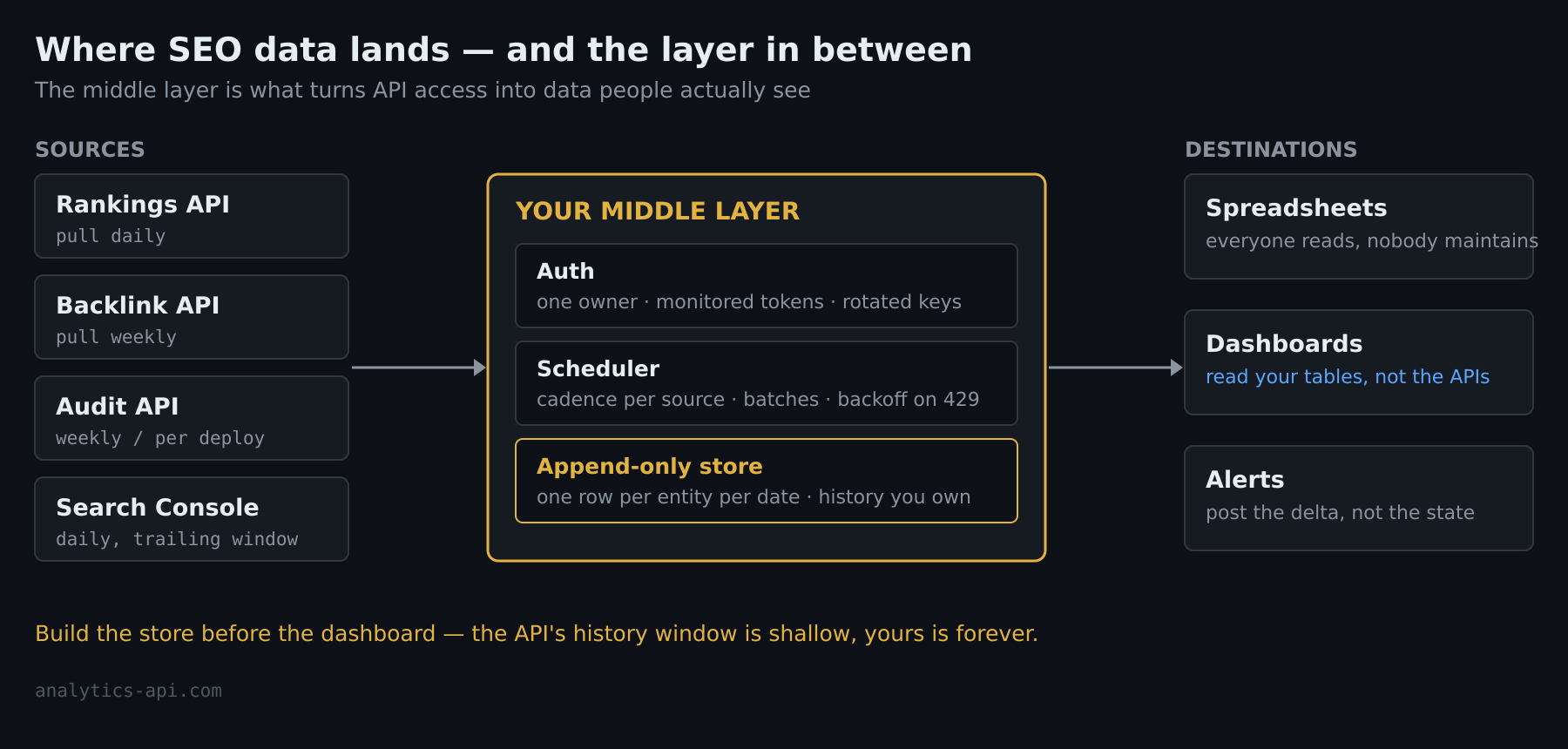
- Spreadsheets. Google Sheets fed by Apps Script or a connector. The default for small teams — everyone can read it, nobody maintains it, and it quietly becomes load-bearing.
- Dashboards. Looker Studio and its BI cousins, fed by native connectors or an intermediate database. Where stakeholders look; rarely where analysts work.
- A warehouse or database. Postgres, BigQuery, anything with a table you own. The only destination that preserves history properly and answers questions you have not thought of yet.
- Alerts. Slack, email, ticket queues — no storage at all, just “position dropped, look.” Cheapest to build, most disciplined to keep useful.
Most mature setups run two of the four: a warehouse (or at least a durable table) as the source of truth, plus either a dashboard or alerts as the visible surface. Starting with only the visible surface is the classic mistake — the dashboard connector pulls live data, keeps no history, and the day you want a year-over-year chart is the day you learn the API only serves three months back.
Pick Your Integration Depth Honestly
Three tiers, in ascending order of both power and babysitting:
- No-code connectors. Looker Studio partner connectors, plus automation platforms — n8n, Make, Zapier — that already speak to the major SEO vendors. Real pipelines get built this way in an afternoon. The trade-offs: you inherit the connector’s schema and refresh limits, transformations beyond filtering get awkward, and the workflow lives inside a third-party platform with its own bill and its own outages.
- Scripts on a schedule. A Python or Node script, a cron entry, a database table. This is the tier I recommend to any team with one developer-shaped person: full control of the schema, trivial to version, and the whole pipeline is readable in one file. Its failure mode is the bus factor — document where it runs and how to restart it, or it dies with its author’s departure.
- Warehouse pipelines. Managed ingestion into BigQuery or similar, with transformation tooling downstream. Right when SEO data is one stream among many and a data team already exists. Overkill when the “data team” is the SEO manager on Thursday afternoons.
I’ve seen this pattern across dozens of implementations: teams pick the tier one level above what they can maintain. The connector team should have used exports; the script team wired up a warehouse they check quarterly. Match the tier to the person who will own it in month six, not to the ambition of week one.
Authentication: the First Wall
Every integration hits auth before it hits data, and SEO APIs split into two camps:
- API-key vendors — most commercial SEO platforms. One static key in a header. The integration risk is not sophistication but hygiene: keys end up hardcoded in scripts, pasted into no-code platforms, and shared in chat. Store them like passwords, scope them where the vendor allows, rotate them when people leave.
- OAuth services — Google Search Console above all. OAuth brings refresh tokens, consent screens and expiry semantics; the payoff is free access to the one dataset every SEO integration eventually wants. Budget real time for it: token refresh is where naive GSC integrations break first, and they break silently — the job keeps running and writes nothing.
Our separate guide to analytics API authentication covers the token mechanics in depth; the integration-level rule is simpler. Whatever the scheme, put the credential in one place, name an owner, and make “the token died” a monitored condition rather than a surprise during the quarterly report.
Rate Limits and the Quota Budget
SEO APIs bill and throttle in credits, rows or requests, and integrations fail here in one of two directions — blowing the budget in a day, or polling so timidly the data is always stale. The middle path is a match between pull frequency and how fast the data actually changes:
- Rankings move daily — pull daily, never hourly. Intraday position noise is real but rarely actionable.
- Backlink profiles move weekly at meaningful scale — weekly pulls cover almost every use case.
- Audit crawls are expensive (billed per page crawled) — weekly or per-deploy, not on a timer for its own sake.
- Search Console data arrives with a processing delay — pulling yesterday’s date every morning mostly re-reads incomplete rows; trail your pull window a couple of days behind and backfill.
Two implementation habits pay for themselves immediately: batch everything the API allows to be batched, and cache responses during development — the fastest way to burn a month’s quota is a debugging loop that re-fetches live on every run. Add exponential backoff on 429s from day one; every vendor throttles eventually, and a pipeline that retries politely survives what a naive loop does not.
Store History or Lose It
The single most consequential integration decision is also the least visible one: append, and never overwrite. Most SEO APIs serve a shallow window of history — the pillar’s section on building a domain report covers exactly what each API forgets — so your table is the only long-term memory the data will ever have. The mechanics are unexciting: one row per entity per date, an idempotent upsert keyed on (entity, date) so re-runs do not duplicate, and the vendor’s raw values stored next to anything you compute. Disk is cheap; the ranking history you did not store in March is unbuyable in November.
Polling, Not Webhooks
Integration platforms have trained everyone to expect push. SEO APIs mostly do not push: rankings, backlinks and keyword data are pull-only in nearly every mainstream vendor, with callbacks appearing only around long-running jobs like audit crawls, where some vendors will ping a URL when the crawl finishes. Design for polling as the default — a scheduler you control, pulling on the cadence from the quota section — and treat any webhook support you find as a pleasant optimization, not the architecture.
When Not to Integrate
One thing I always tell clients: a one-off question deserves a one-off export. If the task is “analyze our striking-distance keywords this quarter,” download the CSV, do the analysis, and resist the pipeline. Integration is for questions you will ask every week — the moment a question becomes recurring, promote it to the pipeline; not before. Half the abandoned SEO dashboards I audit were built for a question that was asked twice.
Wiring It Together: a Reference Shape
The architecture that keeps recurring because it works, at the script tier where most teams land:
- A scheduled job per source — Search Console daily (trailing window), rankings daily, backlinks weekly, audit weekly.
- Everything lands append-only in a database you own, raw fields preserved.
- The dashboard reads your tables, never the vendor APIs directly — dashboards refresh often, and refreshes against live APIs is how quota dies.
- Alerts diff today against yesterday in SQL and post the delta, not the state.
For the concrete version of stages one, two and four against real endpoints, the reporting workflow walkthrough builds it: Search Console plus an analytics API joined into one stakeholder report. And if the automation itself is the interesting part, our piece on automated reporting workflows goes deeper on the delivery half.
Frequently Asked Questions
Can I integrate SEO APIs without writing code?
Yes — Looker Studio connectors cover dashboards, and n8n, Make or Zapier cover scheduled pulls and alerts for the major vendors. The honest limits: you keep the connector’s schema, history depends on the platform’s storage, and complex joins across sources get painful. Teams routinely start no-code and move the pipeline to a script the first time they need something the connector cannot express.
How often should I pull SEO data?
On the cadence the data changes: rankings daily, backlinks weekly, audit crawls weekly or per-deploy, Search Console daily but trailing a few days behind to let Google’s numbers settle. Pulling faster than the source changes spends quota to re-download identical rows.
Do SEO APIs support webhooks?
Mostly no. Core datasets are pull-only across mainstream vendors; where push exists, it is typically a completion callback for long-running audit crawls. Build around a scheduler you own and treat webhook support as a bonus.
Keep Reading
- The SEO API guide — what every SEO API returns, in one map
- SEO reporting API workflow — one pipeline built end to end
- Analytics API authentication — keys, OAuth and token care
- SEO ranking APIs — the position-tracking slice in depth
// Alicia Bennett
Lead Web Analyst based in Toronto with 12+ years in digital analytics — privacy-first tracking, open-source tools, and the analytics API layer that sits under every dashboard.
More about the author →