SEO API: How to Pull Rankings, Backlinks, and Metrics Programmatically
If your SEO workflow still means logging into dashboards and copying numbers into spreadsheets, you’re leaving time and scale on the table. Every major source of SEO data — rankings, backlinks, keyword volumes, click-through rates — exposes an SEO API. Connecting to those APIs directly means you control the data, the cadence, and the format. This guide walks through how that works in practice, which APIs are worth knowing, and how to pull the two data types teams need most: rankings and backlinks.
I’ve helped teams integrate these pipelines across a lot of different stacks. The comparison below reflects what I’ve seen work and where the friction actually shows up — not just what the marketing pages say. For a deeper look at building the reporting layer on top of this data, see our guide on SEO reporting API workflows.
What Is an SEO API?
An SEO API is a programmatic interface that returns search engine data — rankings, backlink profiles, keyword volumes, SERP features, or site-level metrics — in a structured format (almost always JSON) that your code can consume directly.
Instead of clicking through a tool’s UI to export a CSV, you send an authenticated HTTP request and get back exactly the fields you need. From there you can write them to a database, join them with your analytics data, trigger alerts when rankings drop, or build a custom dashboard — whatever the job actually requires.
There are three categories worth separating:
- SERP and rankings APIs — fetch live search results or track keyword positions over time (DataForSEO, SerpAPI, Semrush API)
- Backlink and domain authority APIs — return link profiles, referring domains, anchor text distributions (Ahrefs API, DataForSEO Backlinks)
- Performance data APIs — actual traffic and click data from the search engine itself (Google Search Console API)
Most SEO data pipelines need at least two of these three categories. A ranking tracker without traffic data tells you where you appear; without knowing what that means for clicks, it’s incomplete.
What Data SEO APIs Return
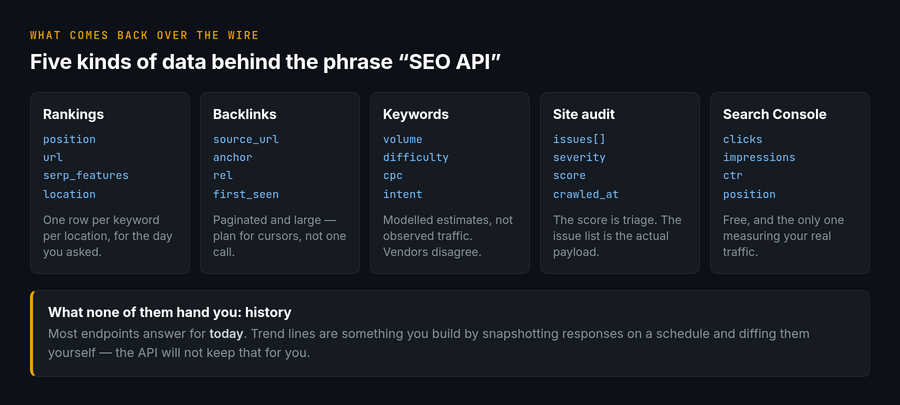
Vendor documentation is organised by endpoint, which makes it hard to answer the question people arrive with: what can I actually get out of these things? Sorted by entity rather than by product, the whole field returns six kinds of record.
| Entity | Typical fields | Refresh cadence | Comparable across vendors? |
|---|---|---|---|
| Keyword | Search volume, difficulty score, CPC, intent label, parent topic, SERP features present | Monthly for volume; difficulty recalculated irregularly | Volume roughly; difficulty never — each scale is proprietary |
| Position | Keyword, URL, rank, device, location, date, SERP feature occupied | Daily to weekly, depending on tier | Yes, if location and device match — otherwise not |
| Backlink | Source URL, target URL, anchor, nofollow flags, first seen, last checked | Continuous crawl, per-vendor index | Source and target yes; totals and authority scores no |
| Domain / URL metric | Authority rating, referring domains, organic traffic estimate, top pages | Weekly to monthly | No — estimates, not measurements |
| On-page / audit | Status code, title, meta, headings, word count, canonical, hreflang, Core Web Vitals | On demand, you trigger the crawl | Yes — this is observed fact, not modelling |
| Own-property performance | Impressions, clicks, CTR, average position by query and page | Daily, with 2–3 days of lag | N/A — only Search Console has it, and only for sites you verify |
The split down the last column is the one worth internalising. Rows three, four and five behave very differently in an integration, and mixing them in the same table is how dashboards start contradicting each other.
Two of these entities are observed: on-page data and your own performance data. Crawl a page and its status code is a fact; Search Console reports impressions your property genuinely received. Store them, trend them, alert on them.
Three are modelled: keyword difficulty, traffic estimates and authority ratings. They are a vendor’s opinion expressed as a number, recalibrated whenever the vendor changes their model. A step in your chart may be a step in their algorithm. Never average them across sources, and always store the vendor name in the same row as the score.
Positions sit in between. A rank is observed, but observed somewhere — from a specific location, on a specific device, at a specific moment. Two vendors disagreeing on your rank usually means they checked from different places, not that one is wrong.
Practical consequence for schema design: give observed and modelled data different tables, or at minimum a column that marks which is which. The first kind can be compared over time without caveats. The second kind needs the vendor and the retrieval date attached to every value, or in six months nobody will be able to say what a number meant.
If you want the buyer’s view of the same field — which source each family is built from and what it costs to query at volume — the spokes on pulling keyword position data and link data take each one a level deeper.
SEO API Comparison: Rankings, Backlinks, and Metrics
Here’s how the major options compare across the dimensions that matter when you’re actually building on top of them.
| API | What it returns | Auth | Rate limit | Free tier | Pricing model | Format |
|---|---|---|---|---|---|---|
| Ahrefs API | Backlinks, referring domains, organic keywords, DR/UR, top pages | Bearer token (header) | Per-plan unit quota | No (paid plans only) | Credit/unit-based; check current pricing | JSON |
| DataForSEO | SERP results, rankings, backlinks, keyword data, on-page metrics | HTTP Basic (login + password) | Concurrent task limit per plan | Yes (trial credits) | Pay-per-task / credits; check current pricing | JSON |
| SerpAPI | Live SERP results (Google, Bing, YouTube, etc.), features, ads | API key (query param or header) | Per-plan monthly search cap | Yes (~250 searches/month) | Subscription tiers; check current pricing | JSON |
| Semrush API | Keyword rankings, organic traffic estimates, backlinks, domain overview | API key (query param) | Per-plan API unit quota | No (Business plan + API units) | Business plan required + API units sold separately; check current pricing | CSV or JSON (endpoint-dependent) |
| Google Search Console API | Real clicks, impressions, CTR, average position (your property only) | OAuth 2.0 or service account | 1,200 queries/min per site and per user; 40,000/min per project | Yes (free, no search cap) | Free | JSON |
A few things the table can’t capture: Ahrefs API data is exceptionally deep on backlinks but requires a paid subscription with no trial. DataForSEO’s model is flexible — you pay per task rather than per seat, which makes it appealing for agencies running high-volume batch jobs. SerpAPI is the clearest path to live SERP scraping without managing proxies yourself. The Google Search Console API is in a different category entirely: it’s the only source of real click and impression data for your own properties, and it costs nothing.
Rankings and SERP API: Tracking Keyword Positions Programmatically
Rank tracking via API means either polling a third-party service that does the checking (DataForSEO, SerpAPI, Semrush) or querying your own GSC data for position averages. The two approaches answer different questions.
The distinction matters enough to have its own page: what Google offers for ranking data and what it does not covers what Search Console’s position field really measures against a paid SERP API, and how to store history the API will not keep for you.
Third-party SERP APIs give you the actual page-one results for any keyword, from any location, as of now. You can check competitors’ positions, track features like featured snippets or local packs, and build rank monitoring for clients who haven’t given you GSC access. The trade-off is cost — each check consumes a credit or request.
GSC gives you position data for keywords your own site already appears for, aggregated over a date range, with real click counts. It’s less granular per query (you can’t get a single moment-in-time position), but for your own property it’s the most accurate source available.
Python Example: Pull Keyword Rankings from Google Search Console
Here’s a minimal script that authenticates with a service account and fetches 28 days of rankings data, broken down by query and page:
from google.oauth2 import service_account
from googleapiclient.discovery import build

SCOPES = ['https://www.googleapis.com/auth/webmasters.readonly']
SERVICE_ACCOUNT_FILE = '/path/to/service-account.json'

credentials = service_account.Credentials.from_service_account_file(
    SERVICE_ACCOUNT_FILE, scopes=SCOPES
)
gsc = build('searchconsole', 'v1', credentials=credentials)

response = gsc.searchanalytics().query(
    siteUrl='https://yoursite.com/',
    body={
        'startDate': '2026-05-26',
        'endDate':   '2026-06-22',
        'dimensions': ['query', 'page'],
        'rowLimit':   25000,
        'dataState':  'final'
    }
).execute()

for row in response.get('rows', []):
    query, page = row['keys']
    print(
        f"Query: {query} | Page: {page} | "
        f"Position: {row['position']:.1f} | Clicks: {row['clicks']}"
    )
A few practical notes: the GSC API lags roughly 2-3 days behind real time, so set your end date accordingly. Maximum row limit per request is 25,000; for larger sites you’ll need to paginate using startRow. Always use 'dataState': 'final' — preliminary data can shift and will make your trend analysis noisy.
Store the service account JSON key outside version control. A secrets manager or environment variable is the right home for it.
Backlinks API: Pulling Link Profiles at Scale
Backlink data is where the paid APIs earn their keep. The Google Search Console API returns a small sample of links to your site via the links.list endpoint, but it’s not designed for comprehensive link analysis. For real backlink data — referring domains, anchor text, dofollow/nofollow splits, historical trends — you need Ahrefs API or DataForSEO’s backlink endpoints.
In my experience, the most common use case isn’t pulling your full link profile on demand. It’s scheduled monitoring: run a daily or weekly pull of new referring domains, flag drops in DR, and alert when a high-value backlink disappears. That pattern keeps costs low and keeps the signal-to-noise ratio high.
Backlink endpoints have enough quirks of their own — disagreeing totals, proprietary authority scores, row-based billing, pagination that eats your quota — that they are covered separately, with working code, in our backlink API guide.
For a broader look at connecting these data sources into automated workflows, see our web analytics API overview.
Keyword Volume and Keyword Data APIs
Keyword volume data — how often a term is searched — comes primarily from third-party providers that aggregate their own panel or clickstream data. The main options are Semrush API, DataForSEO (Keywords Data endpoints), and Ahrefs API.
A few things I tell every team building on keyword volume data:
- Volume is an estimate, not a measurement. Different providers return different numbers for the same keyword. This is expected — treat volume as a relative signal, not an absolute count.
- Check the geographic granularity available. Country-level volume is the default; city-level data is available from some providers but at higher cost per call.
- Batch your requests. Most APIs let you submit multiple keywords in a single request. Always do this — it’s dramatically more efficient than one-at-a-time calls.
The Semrush API returns keyword data in a mix of CSV and JSON depending on the endpoint — something to account for in your parsing logic. DataForSEO’s keyword endpoints use a task-based model: you POST a task, get a task ID back, then poll for results. That async pattern is more complex to implement but handles large batches cleanly.
For implementation patterns around pulling and validating this kind of data programmatically, the analytics data validation guide covers the common failure modes worth anticipating.
Site Audit and Scoring APIs: Crawls, Checks, and the Number at the End
Audit endpoints work differently from every other SEO API. They do not read an index — they go and fetch your pages, which makes them asynchronous, slower, and priced by pages crawled rather than by rows returned. We unpack this category — how the score is computed, the free PageSpeed route, and what to automate — in our dedicated guide to SEO score APIs.
The call pattern reflects that. You start a crawl, receive a task identifier, poll until it finishes, then collect results. A request that returns data immediately is checking a single URL; anything site-wide is a job.
import os, time, requests

BASE  = "https://api.example-seo-vendor.com/v3/audit"
TOKEN = os.environ["SEO_API_TOKEN"]
H     = {"Authorization": f"Bearer {TOKEN}"}

# 1. start the crawl
task = requests.post(f"{BASE}/start", headers=H, json={
    "target": "https://example.com/",
    "max_pages": 500,
    "respect_robots": True,
}).json()["task_id"]

# 2. poll until it finishes - capped so this cannot spin forever
for _ in range(60):                       # ~30 min at a 30s interval
    st = requests.get(f"{BASE}/status/{task}", headers=H).json()
    if st["status"] in ("finished", "failed"):
        break
    time.sleep(30)

if st["status"] != "finished":
    raise RuntimeError(f"audit did not finish: {st}")

# 3. collect results, paginated
issues = requests.get(f"{BASE}/issues/{task}", headers=H,
                      params={"limit": 1000}).json()["issues"]
Two details save trouble. Cap the polling loop — a crawl that never reports finished will otherwise hold a worker indefinitely. And set max_pages deliberately: audit endpoints bill per page, so an unbounded crawl of a site with faceted navigation can cost more than the rest of your month.
What the checks cover
Naming differs between vendors, but the checks group into four families, and only the first two are unambiguous.
- Response and crawlability — status codes, redirect chains, robots directives, canonical targets, sitemap membership. Binary facts; alert on these.
- On-page elements — title and meta presence and length, heading order, image alt, hreflang reciprocity. Also factual, though “too long” thresholds are conventions rather than rules.
- Content signals — thin pages, duplicate clusters, word counts. Useful for triage, opinionated by design; do not wire alerts to them.
- Performance — Core Web Vitals, page weight. Note whether the vendor reports lab or field data: lab numbers come from one synthetic run and move for reasons unrelated to your site.
The site score is a triage tool, not a KPI
Most audit APIs return a single health score out of 100. It is a weighted sum of the issue counts above, with weights the vendor chose and can change.
That makes it genuinely useful for one job — ranking twenty client sites so you know which to open first — and misleading for the job it usually gets given, which is proving progress to a stakeholder over time. Fix fifty missing alt attributes and the score jumps; fix the redirect chain that was actually costing you crawl budget and it barely moves.
Store the underlying issue counts by category and report on those. If a score has to appear in the deck, put the vendor’s name next to it and never compare it against a score from a different tool.
Google Search Console API: The Free Option Worth Starting With
If you’re new to SEO APIs, start with the Google Search Console API. It’s free, it returns real data (not estimates), and it covers the two metrics that matter most for ranking work: clicks and average position.
Authentication requires either OAuth 2.0 (appropriate for user-facing apps where you need per-user data) or a service account (appropriate for server-side automation). For unattended scripts, the service account route is strongly preferred — set it up once and your pipeline runs without any human in the loop.
The limits worth knowing:
- Search Analytics is metered at 1,200 queries per minute per site and 1,200 per user — the per-project ceiling is far higher at 40,000 per minute, so the site and user quotas are the ones that bind
- 25,000 rows per request (paginate with
startRowfor large sites) - Data lags 2-3 days behind real time
- A rolling historical window rather than a permanent archive — the oldest data ages out as new days land
The GSC API is also the right tool for URL inspection at scale — checking indexation status, last crawl date, and canonical issues across large sets of pages programmatically. See the official GSC API reference for the full endpoint list.
One thing GSC can’t do: competitive data. You can only query properties you own. For competitive ranking intelligence, keyword gap analysis, or backlink monitoring of domains you don’t control, you need one of the paid APIs.
Building a Domain Report: the History the API Will Not Keep
Every SEO API answers the question “what is true now”. Almost none of them answer “what was true in March”, and the ones that do charge for depth and cap how far back you can reach.
That gap is why most integrations exist. A domain report covering a quarter is not one API call — it is ninety days of stored snapshots that you accumulated because you started early.
Snapshot, then diff
The pattern is the same whichever vendor you use: pull the current state on a schedule, write it immutably with a retrieval date, and compute change by comparing rows rather than by asking the API what changed.
- Never update a row in place. Yesterday’s rank is data, not a stale value to overwrite. Append, key on (entity, date).
- Store the retrieval timestamp, not just the date — rank checks at 09:00 and 21:00 legitimately differ, and you will want to know which you have.
- Record the request parameters alongside the result. Location, device and language turn an unexplainable rank drop into an obvious configuration change six months later.
- Keep the raw response for a short window. When a number looks wrong, the only way to tell a parsing bug from a vendor change is to look at what actually arrived.
Search Console is the exception worth planning around. Its history is a rolling window, not an archive: the oldest data drops off the back as new days arrive, so a year-on-year comparison you can run this quarter may be impossible the next. Export it into your own store from day one — the API gives it away, and the window moves whether or not you were paying attention.
What a domain report is made of
Four series cover most of what a stakeholder asks. Each comes from a different entity, so build them as separate tables and join at report time rather than assembling one wide row per day.
- Visibility — how many tracked keywords sit in the top 3, 10 and 20. More robust than average position, which one new long-tail keyword can swing.
- Own performance — impressions and clicks from Search Console, which is the only source that reports what happened rather than what a model expects.
- Link profile — referring domains gained and lost, counted from your own snapshots rather than from the vendor’s lost-link flag.
- Technical state — status codes, indexable pages, Core Web Vitals. Observed data, so it can be compared over time without caveats.
Resist adding a fifth series made of estimated organic traffic. It moves when the vendor recalibrates, and explaining that to someone who watched the line drop costs more than the metric is worth.
Scheduling follows from cost rather than from ambition. Positions weekly is enough for reporting; daily is for a handful of commercially critical terms. Backlinks weekly, because vendor indexes do not refresh faster than that in practice. Search Console daily, since it is free and has a two-to-three day lag you cannot shorten. Technical crawls monthly, or on deploy.
Choosing the Right SEO API for Your Use Case
The right API depends almost entirely on what question you’re trying to answer. And once you have picked one, the work shifts to plumbing — auth, pull cadence, storage — which we cover separately in SEO API integration.
| If you need… | Start with |
|---|---|
| Real click and impression data for your own site | Google Search Console API (free) |
| Live SERP results for any keyword | SerpAPI or DataForSEO SERP endpoints |
| Deep backlink and domain authority data | Ahrefs API |
| Keyword volumes at scale, competitive research | Semrush API or DataForSEO Keywords Data |
| High-volume agency workflows with flexible billing | DataForSEO (pay-per-task model) |
| Combining SEO data with semantic content analysis | GSC API + see semantic SEO analytics |
Don’t over-engineer the stack at the start. Most teams get 80% of the value they need from the GSC API and one paid supplementary source. Add complexity when a specific use case demands it, not in advance.
Frequently Asked Questions
What is an SEO API?
An SEO API is a programmatic interface that returns search engine data — rankings, backlinks, keyword volumes, or SERP results — in a structured format (typically JSON) that applications can consume directly. Instead of manually exporting data from a tool’s dashboard, you send an authenticated HTTP request and receive structured data you can write to a database, feed into a dashboard, or process with code. The term covers both first-party APIs (like the Google Search Console API, which returns data about your own properties) and third-party APIs (like Ahrefs or SerpAPI, which return data about any domain or keyword).
Is there a free SEO API?
Yes — the Google Search Console API is free and returns real performance data (clicks, impressions, average position, CTR) for properties you own. It has no cost per request and generous rate limits for most use cases. SerpAPI and DataForSEO both offer trial credits so you can test their endpoints before committing to a paid plan. Beyond that, most comprehensive SEO data sources — backlinks, keyword volumes for arbitrary terms, competitor rankings — require paid access. The underlying data is expensive to collect and maintain, and that cost flows through to the API pricing.
What are the rate limits for SEO APIs?
Rate limits vary significantly by provider and plan tier. The Google Search Console API meters Search Analytics at 1,200 queries per minute per site and 1,200 per user, with a much higher per-project ceiling of 40,000 per minute — so in practice it is the per-site and per-user quotas you plan against, not the project one. Third-party providers set limits based on your subscription: SerpAPI caps monthly searches per plan, DataForSEO limits concurrent tasks, and Ahrefs meters usage against a monthly unit quota. The practical advice: design your pipeline to batch requests, add retry logic with exponential backoff, and monitor consumption against your plan limits — especially for Ahrefs API, where a single deep backlink pull can consume a meaningful share of a monthly quota.
Which SEO API should I use for rank tracking?
It depends on whose rankings you’re tracking. For your own site’s performance in Google, the Google Search Console API returns real average position data and is the most accurate source available — because it’s coming directly from Google. For checking where any page ranks for a specific keyword right now, or for tracking competitor positions, you need a third-party SERP API like SerpAPI, DataForSEO, or the Semrush API. Many teams use both: GSC API for owned-property performance tracking, a paid API for competitive and keyword research.
Can I combine SEO API data with web analytics data?
Yes, and it’s one of the more powerful things you can do with these APIs. The typical pattern is to join GSC data (clicks, impressions, position by page and query) with analytics platform data (sessions, bounce rate, conversions by page) on the page URL. The result is a unified view that connects search performance to on-site behaviour — something neither source gives you alone. The main implementation gotcha is URL normalization: trailing slashes, protocol differences, and UTM parameters need to be stripped before joining. See our SEO reporting API workflow guide for a worked example of exactly this pattern.
How do I authenticate with SEO APIs?
Authentication varies by provider. The most common patterns:
- API key in header (SerpAPI, Ahrefs): pass a static key as a Bearer token or custom header — simple to implement, easy to rotate
- API key as query parameter (Semrush): append your key to the request URL — works but the key appears in server logs, so prefer header auth when available
- HTTP Basic auth (DataForSEO): encode your login and password as a Base64 header — straightforward but treat credentials with the same care as any secret
- OAuth 2.0 / service account (Google Search Console API): the most complex setup but necessary for accessing Google’s APIs; for server-side automation always use a service account rather than user OAuth
In all cases: store credentials in environment variables or a secrets manager, never in source code. Rotate keys when team members leave or if a key is exposed.
// Alicia Bennett
Lead Web Analyst based in Toronto with 12+ years in digital analytics — privacy-first tracking, open-source tools, and the analytics API layer that sits under every dashboard.
More about the author →