Backlink APIs: How to Pull Link Data Programmatically
Pull your backlink count from two vendors on the same afternoon and you will get two different numbers. Not slightly different — often different by a factor of three.
Neither vendor is wrong. Backlink APIs are the one corner of the SEO stack where the data itself is proprietary, because each vendor runs its own crawler and sees its own slice of the web. Once you understand that, the integration decisions get much easier.
This guide covers what these APIs return, why the numbers disagree, how to pull a full link profile without exhausting your quota, and what to store so you can spot losses later.
What a backlink API returns
Every backlink endpoint returns rows of link records. The field names differ, but the shape is consistent across vendors.
| Field group | Typical contents | Stable across vendors? |
|---|---|---|
| Source | Referring page URL, referring domain, first seen date, last checked date | Yes — this is observed fact |
| Target | The URL on your site that receives the link | Yes |
| Link attributes | Anchor text, nofollow / sponsored / ugc, link position, image or text | Mostly — parsing edge cases differ |
| Authority scores | Domain-level and page-level strength ratings | No — each is proprietary and on its own scale |
| Status | Live, lost, broken, redirected | No — depends entirely on recrawl frequency |
The first three groups are safe to treat as facts. The last two are opinions, and building logic on them without noticing is how a monitoring script starts firing false alarms.
Why two vendors never agree on your link count
Three independent causes stack up, and together they explain almost every discrepancy you will be asked about.
- Different crawl coverage. Each vendor decides which pages are worth recrawling and how often. A link on a rarely-crawled page exists in one index and not another.
- Different retention of dead links. One vendor drops a link weeks after the page stops responding; another keeps it flagged as lost for months. Your “total backlinks” figure depends on that policy more than on your link building.
- Different deduplication. Sitewide footer links can be reported once per domain or once per page. A single template link across 40,000 pages is either one backlink or forty thousand, depending on whose endpoint you called.
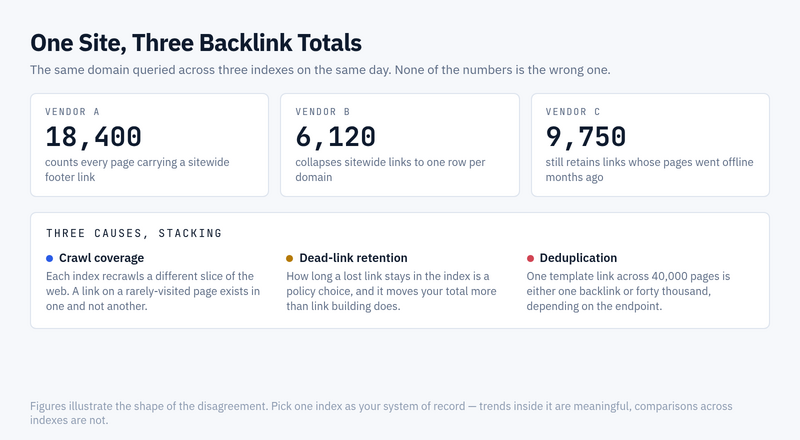
The practical rule that falls out of this: pick one vendor as your system of record and stay with it. Trend lines within a single index are meaningful. Comparisons across indexes are not, and no amount of normalisation will fix that.
Authority scores are not a shared unit
Every major vendor ships a domain-strength number, and every one of them is computed differently on its own scale.
| Vendor | Domain-level metric | Page-level metric |
|---|---|---|
| Ahrefs | Domain Rating | URL Rating |
| Moz | Domain Authority | Page Authority |
| Majestic | Trust Flow, Citation Flow | Trust Flow, Citation Flow |
| Semrush | Authority Score | Authority Score |
They are all roughly logarithmic, which means the gap between 20 and 30 is nothing like the gap between 70 and 80. Averaging them, or storing a column called authority that gets filled by whichever API answered, produces a number with no defined meaning.
Store the vendor name alongside the score. It costs one column and saves the conversation six months later when nobody remembers where the figure came from.
Pulling a full profile without burning your quota
Backlink endpoints are the most expensive calls in an SEO API, because the vendor is serving rows out of a very large index. Quotas are usually metered by rows returned rather than by requests made, so a careless limit parameter costs real money.
Four habits keep the bill predictable:
- Ask for referring domains before referring pages. Domain-level rows are a fraction of the volume and answer most reporting questions on their own.
- Filter server-side, not in your own code. Every row you discard after it arrives has already been charged. Push the dofollow filter, the date window and the target-URL prefix into the request.
- Select only the fields you store. Most backlink endpoints let you name the columns. Requesting all of them by default is the single most common way to triple a quota bill.
- Pull deltas after the first sync. The initial import is unavoidable. Everything after it should be scoped by first-seen date so you fetch only what changed.
Run the first import against a single subfolder before you point it at the whole domain. In my experience the surprise is never the API — it’s discovering that a forgotten subdomain carries 80% of the link rows you just paid for.
A paginated pull in Python
The pattern below is vendor-neutral. Swap the endpoint, the auth header and the field names, and the control flow stays the same — request a page, stop when the vendor returns fewer rows than you asked for, back off when it rate-limits you.
import os, time, requests

API = "https://api.example-seo-vendor.com/v3/backlinks"
TOKEN = os.environ["SEO_API_TOKEN"]
PAGE = 1000                      # rows per request — this is what you are billed on

def fetch_backlinks(target, since=None):
    rows, offset = [], 0
    while True:
        params = {
            "target": target,
            "mode": "domain",
            "limit": PAGE,
            "offset": offset,
            # ask only for what you store
            "select": "url_from,url_to,anchor,is_nofollow,first_seen,domain_rating",
        }
        if since:
            params["first_seen_after"] = since

        r = requests.get(API, params=params,
                         headers={"Authorization": f"Bearer {TOKEN}"}, timeout=60)

        if r.status_code == 429:                 # quota or burst limit
            wait = int(r.headers.get("Retry-After", 60))
            time.sleep(wait)
            continue                             # same offset, no rows lost

        r.raise_for_status()
        batch = r.json().get("backlinks", [])
        rows.extend(batch)

        if len(batch) < PAGE:                    # last page
            return rows
        offset += PAGE
Two details matter more than they look. The retry continues from the same offset, so a rate limit costs time instead of data. And the loop terminates on a short page rather than on a total count, because totals reported by backlink endpoints are estimates and frequently disagree with the rows actually delivered.
If you are wiring this into a broader pipeline, the authentication side is covered in API keys, OAuth, and tokens explained.
Rate limits, and what hitting them looks like
Backlink APIs enforce two separate ceilings, and confusing them will send you debugging in the wrong direction.
- A quota — how much data you may pull per month. Exhausting it stops you until the period resets, and no amount of waiting inside the run will help.
- A burst limit — how fast you may ask. This one clears in minutes, and a backoff loop handles it without intervention.
A clean 429 with a Retry-After header is the friendly case. The one that costs an afternoon is different: sustained hammering of a backlink endpoint can trip the edge network sitting in front of the API rather than the API itself.
When that happens you stop receiving JSON and start receiving an HTML challenge page with a 403. Your client reports a parse error or an auth failure, both of which are misleading — the credentials are fine and the quota may be barely touched.
We have tripped this running batches of a few dozen sequential lookups against a live vendor endpoint. The cooldown ran to the better part of an hour, and no retry loop shortened it. Three habits avoid the whole class of problem:
- Check the content type before parsing. If the response is not JSON, log the first 200 characters rather than raising a decode error. That one line turns an unexplained crash into an obvious block page.
- Treat
403as back off, not as authenticate again. Retrying with fresh credentials against an edge block just extends the cooldown. - Put a deliberate pause between sequential lookups when iterating over many targets, and cap concurrency at a small number. Finishing a batch slowly beats losing an hour partway through.
Log the remaining-quota header on every response if the vendor sends one. Discovering you are out of rows at the end of a monthly job is a much worse experience than watching the number descend.
Storing history so you can see losses
A backlink API tells you what exists today. It will not tell you what you had in March unless you kept it, and lost links are the reason most teams build this integration in the first place.
Snapshot on a schedule and compare, rather than trusting the vendor’s own lost-link flag. That flag depends on their recrawl cadence, so it arrives late and sometimes reverses itself.
- Key on the pair of source URL and target URL, not on a vendor row id — those are not stable between pulls.
- Record
first_seenandlast_seen_in_our_pull, so a link missing from two consecutive syncs can be treated as lost without a vendor flag. - Keep the anchor text as delivered. Anchor distribution shifts are a leading indicator, and normalising case or whitespace on write destroys the signal.
- Require two consecutive misses before alerting. One missed pull is usually a partial index refresh, not a removed link.
That last rule is what turns a noisy script into one people keep enabled. Single-pull disappearances are common enough that alerting on them trains everyone to ignore the channel.
Picking a vendor by what you are building
The right choice depends less on index size claims than on the shape of your job.
| What you are building | What to weigh |
|---|---|
| Loss monitoring for one site | Recrawl frequency beats index size. A larger index that refreshes slowly reports your lost link a month late. |
| Prospecting at scale | Row cost and server-side filtering. You will discard most of what you pull, so filtering must happen before billing. |
| Client reporting | Metric stability. A vendor that recalibrates its authority score annually will make your charts step for no reason. |
| Competitive gap analysis | Batch endpoints. Comparing ten domains one request at a time is slow and usually more expensive. |
Whatever you pick, run a trial pull against a domain whose link profile you already know by hand. Vendor documentation describes the happy path; a domain you can verify tells you what the index actually holds.
For the wider picture of how backlink endpoints sit alongside rankings and keyword data, see the SEO API guide.
Frequently asked questions
Is there a free backlink API?
Not a general one. Search Console exposes the links Google knows about for sites you own, through the interface rather than a full links endpoint, and it covers only your own properties. Any competitor link data comes from a commercial index.
Why does the API report fewer backlinks than the vendor’s own dashboard?
Usually because the dashboard defaults to a different aggregation. Interfaces commonly show one row per referring domain while the endpoint returns one row per referring page, or the reverse. Check the mode parameter before assuming data is missing.
Can I combine two vendors for better coverage?
You can union the link records, since source and target URLs are comparable facts. Do not merge the authority scores, and do not report a combined total as a trend — the union grows whenever either vendor recrawls, which looks like link growth and is not.
How often should the sync run?
Weekly is enough for most sites, because vendor indexes do not refresh faster than that in practice. Daily pulls mostly buy you the same rows at seven times the cost.
Do nofollow links belong in the dataset?
Store them, report on them separately. Filtering them out at ingest means you cannot answer questions about anchor distribution or referral traffic later, and re-pulling history is the expensive way to fix that.
Where to start
Pull referring domains for one property, store the source-target pairs with dates, and run it twice a week apart. The second pull is where the integration proves itself, because it is the first time you can see a difference.
Only widen the field selection once you know which columns you look at. Every extra field is a row-cost multiplier on a dataset that grows on its own.
// Alicia Bennett
Lead Web Analyst based in Toronto with 12+ years in digital analytics — privacy-first tracking, open-source tools, and the analytics API layer that sits under every dashboard.
More about the author →