SEO Data APIs: What You Get, What You Pay, and Which One to Pick
Type “SEO data API” into a search box and the vendor pages line up with the same promise: rankings, keywords, backlinks, audits, “all in structured JSON”. What the pages skip is that those four words cover six unrelated data sources, four different ways of billing you, and rate limits that decide whether your nightly job finishes before breakfast. An SEO data API is a class of product, not a single thing — and choosing one well means understanding the class before you compare vendors.
This piece is the map for that class. It sits inside our SEO API guide series: the pillar pulls rankings and backlinks from SEO APIs in code, and the spokes on ranking APIs, backlink APIs and site audit and score APIs each take one slice. Here I stay one level up — what the data is, where it comes from, what you pay for it, and how to pick a provider without regretting it in month three.
What is an SEO data API?
An SEO data API is an HTTP interface — paid or free — that returns search-related data as structured JSON your own code can store and query: keyword rankings, the contents of a results page, search volumes, backlink records, crawl findings and, lately, citations inside AI assistants. It sells the data without the dashboard. You bring the storage, the charts and the questions. The class travels under a dozen names — SEO analysis API, SEO report API, API for SEO metrics — and the labels say more about the vendor’s marketing than about what comes back.
The distinction that matters in practice is between a data API and an SEO tool API. A data API answers questions about any domain or keyword from the vendor’s index — what does example.com rank for, how many referring domains does this URL have. A tool API (SE Ranking calls theirs a Project API, and the naming is spreading) automates the vendor’s own product: create a rank-tracking project, add keywords, fetch the report the interface would show. Suites ship both layers under one key and pricing pages blur them, so ask which layer you are buying. When teams ask me about an “SEO software API”, nine times out of ten they mean the tool layer; “we want to build our own thing” means the data layer.
What is API in SEO more broadly? Just this: instead of exporting a CSV by hand every Monday, a scheduled script asks the source directly and writes rows into a table you own. Dashboards, alerts and the client report read your table, not the vendor. That one design decision is why API access is worth paying for, and it is the whole argument of our SEO API integration guide.
What data can you get from an SEO API?
Six families, from six different places. The source matters more than the endpoint name, because it decides how fresh the data is, whether a number is a measurement or an estimate, and whether anyone will give it to you for free.
| Data family | Where it comes from | Observed or modelled | Typical fields | Free source? |
|---|---|---|---|---|
| SERP and rankings | Live result-page fetches per keyword, location and device | Observed — at one place, one moment | Position, ranking URL, SERP features, AI Overview present, top-100 listing | Only for your own site: Search Console average position |
| Keyword metrics | Vendor models built on clickstream panels and ads data | Modelled | Search volume, keyword difficulty, CPC, intent, related keywords | No — Search Console gives impressions, not volume |
| Backlinks | The vendor’s own crawler and link index | Observed, but index-dependent | Source and target URL, anchor, nofollow flags, first and last seen, referring domains | No |
| Site audit | A crawl of your site that you trigger | Observed | Status codes, titles, canonicals, broken links, page weight, health score | Partly — PageSpeed Insights, one URL at a time |
| Own-property performance | The search engine’s own logs | Observed | Clicks, impressions, CTR, average position by query, page, country, device | Yes — Search Console API, Bing Webmaster API |
| AI visibility | Sampled prompts run against AI assistants | Sampled, then modelled | Brand mentions, cited URLs, share of voice per engine, prompt lists | Search Console shows generative-AI impressions in the interface, for a subset of sites |
The pillar’s entity-by-entity breakdown explains why observed and modelled numbers need different tables. Cutting the same fields by source adds the buying lens: a ranking is a fetch you could in principle run yourself, so it is priced per request; a keyword research API and a backlinks API sit on an index the vendor spent years building, so they are priced by how much of it you pull; performance data is a byproduct of the search engine, so it is free — for your own properties and nobody else’s.
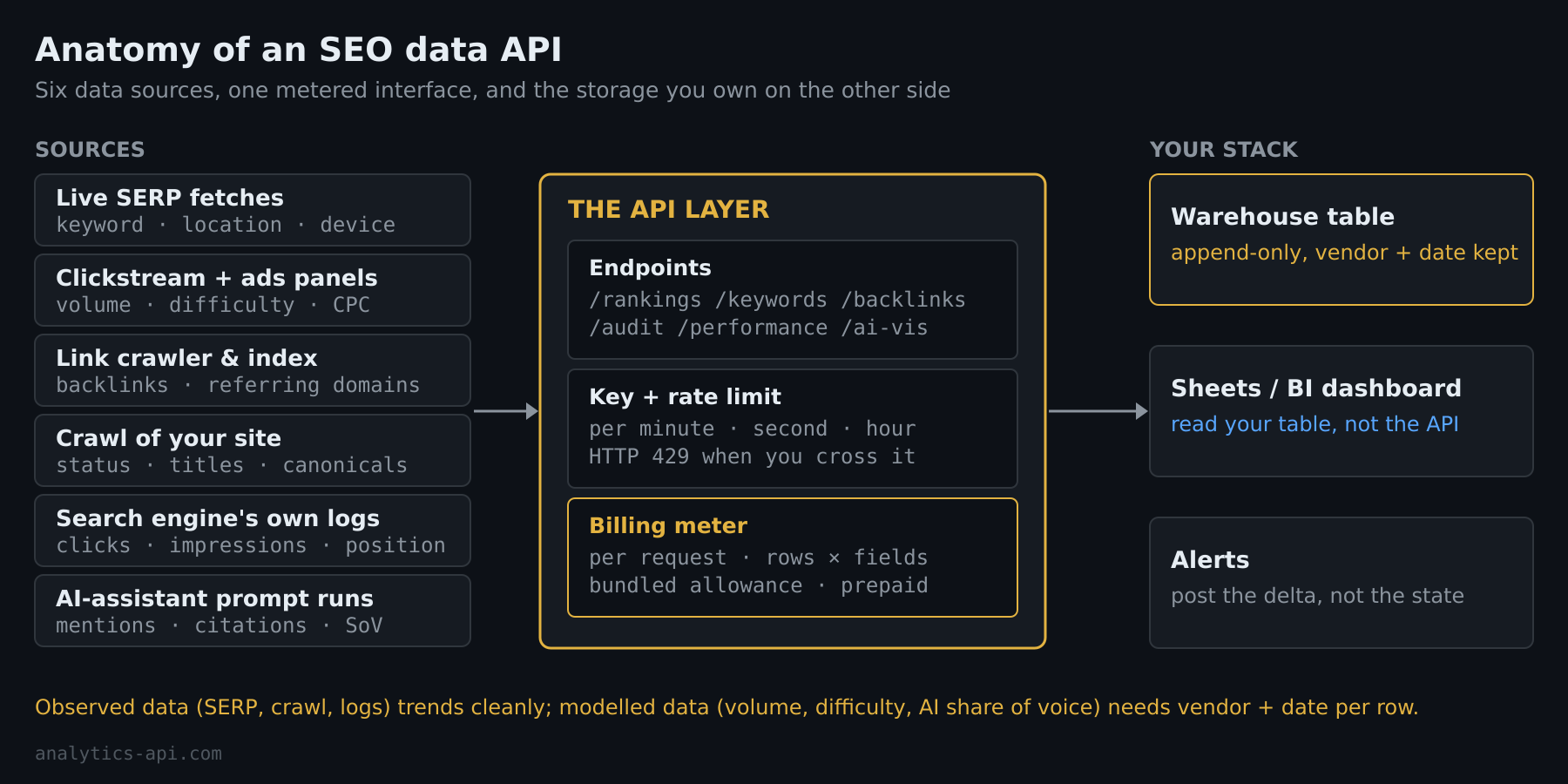
Three families have their own spoke. Rank tracking, and why Search Console’s average position and a tracker’s absolute rank are different numbers, lives in the SEO ranking API guide. Link counts, and why two vendors never agree on yours, are in the backlink API guide. Audit crawls and the score at the end of them — what vendors label a site audit or website audit API — are the subject of the SEO score API piece. Keyword metrics get one sentence here because they trip up more integrations than the rest combined: search volume is a monthly estimate and keyword difficulty a proprietary scale, both recalibrated without notice, so store the vendor name and retrieval date next to every value or a model update will look like a market shift in your charts.
The four SEO API pricing models
Four billing models cover almost every provider: a fixed number of requests per month, metered credits or units whose cost depends on what each response contains, API access bundled into a subscription tier with a monthly allowance, and a prepaid balance you draw down per task. Each is cheap for a different shape of usage — and expensive for the others.
Per request. The SERP API vendors bill this way because their unit of work is one search. SerpApi’s plans are defined by successful searches per month plus a guaranteed hourly throughput — 250 searches on the free tier, 1,000 on Starter, 15,000 on Production, with cached and failed searches not counted (figures from their pricing page at the time of writing). The model is wonderfully predictable: keywords × locations × devices × days is your bill.
Metered by response. The index vendors charge for what you pull, not how often you ask. Ahrefs meters every request in units, with a minimum of 50 per call and a cost that rises with the rows returned and the fields requested; eligible plans include a monthly allowance, and on some plans overage is charged automatically (Ahrefs API introduction). Semrush’s Standard API prices per line of response, and its own documentation gives arithmetic that should make everyone pause: one line of the Domain Organic Search Keywords report costs 10 units live and 50 units for historical data, so 1,000 keywords for 100 domains is 1,000,000 units live and 5,000,000 historical (Semrush API basics). Two levers follow: request only the fields you will store, and treat historical pulls as a one-time backfill, never a nightly habit.
Bundled with a tier. Serpstat’s plan table shows the pattern cleanly: API access starts at the mid-tier plan, monthly API credits climb from 200,000 to 2,000,000 by tier, and the requests-per-second cap climbs with them from 1 to 10 (Serpstat plans). SE Ranking includes API access in every subscription and sells credits three more ways — pay-as-you-go packs whose credits do not expire, an annual stand-alone plan with no web app attached, and an add-on for existing subscribers (SE Ranking API pricing). Bundled access is the cheapest route when a team already pays for the suite, and the expensive one the day the API is the only thing you use.
Prepaid balance, per task. The fourth model has no subscription at all: you deposit money and each task deducts its price. It suits spiky, unpredictable volume and punishes anyone who forgets a runaway loop, because there is no monthly ceiling to hit. You will meet it in the provider table below.
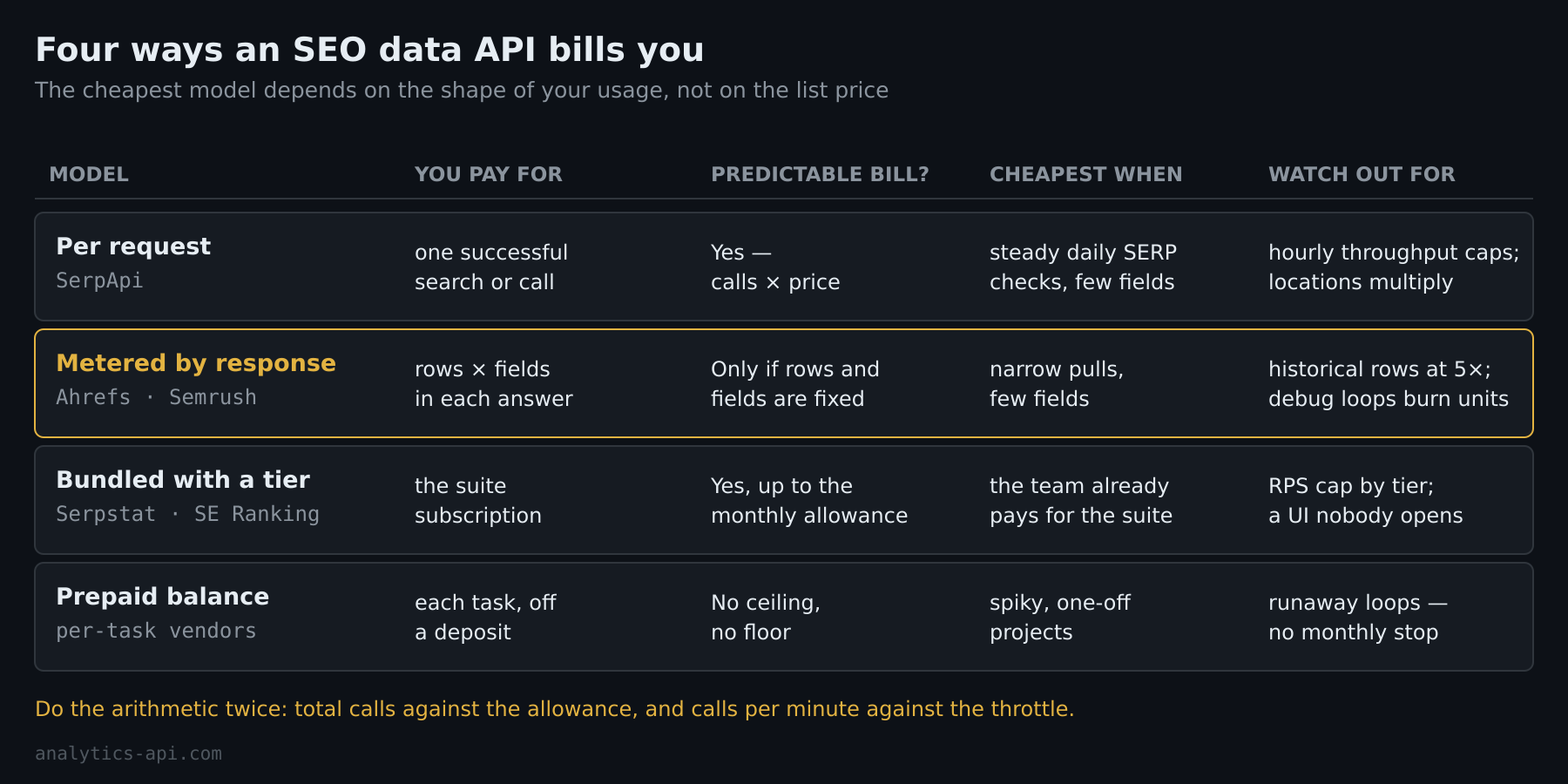
Rate limits are the second axis of cost, and they hide on a different documentation page. Ahrefs allows 60 requests per minute by default and answers with HTTP 429 beyond that; SerpApi’s guaranteed throughput is per hour and grows with the plan; Serpstat’s cap is per second and per tier; the Search Console API allows 1,200 queries per minute per site and per user (usage limits). In my 12 years working with analytics platforms, the budgeting mistake I see most often is not the price per call — it is a job sized for a monthly quota that cannot physically finish inside the per-minute one. Do the arithmetic both ways: total calls against the allowance, and calls per minute against the throttle.
Is there a free SEO API?
Yes, for data about your own properties. Google’s Search Console API and Bing’s Webmaster API return your real clicks, impressions and positions at no charge, and Google’s PageSpeed Insights API scores any URL for free. For data about other people’s domains — volumes, competitor keyword rankings, backlinks — the free options are trials and small tiers, not a product.
The Search Console Search Analytics endpoint is the Google API for SEO to learn first. You POST a date range and the dimensions you want — query, page, country, device, date, hour, search appearance — and get rows back sorted by clicks. rowLimit goes to 25,000 per call with startRow for paging, a type filter switches between web, image, video, news, Discover and Google News, and dataState=all opts you into the fresh, not-yet-final days (searchanalytics.query reference).
Two caveats belong in your design notes. The reference page states the first outright: the API “does not guarantee to return all data rows but rather top ones”, so a query that asks for everything still comes back topped and trimmed. The second is a property of Search Console itself rather than of this endpoint — performance data lives in a rolling window, and the oldest days drop out of it as new ones arrive, which makes an append-only table of your own the only long-term archive. There is also no Google API that returns rankings for an arbitrary keyword; the ranking API spoke explains why.
Bing’s side is simpler: one API key per user, generated in Bing Webmaster Tools, covering every site verified under that account (getting access). Among paid vendors, SerpApi’s free plan gives 250 searches a month, Ahrefs offers a limited set of free test queries on plans without API eligibility, and SE Ranking lets you exercise the API during its trial — enough to build against, not enough to run on. The free-first order I set up with most teams is Search Console for performance, PageSpeed for per-URL health, and one paid source for whichever family the question needs; the reporting workflow walkthrough builds exactly that combination.
Can an SEO API show AI Overview and LLM citations?
Yes — it is the newest family, and the least standardised. Suite vendors now sell endpoints that run prompt sets against ChatGPT, Gemini, Perplexity, Google’s AI Mode and AI Overviews and return which brands and URLs were mentioned or cited. Google’s own generative-AI numbers exist too, but for now only inside the Search Console interface, not the API.
Two examples of what is on the market. SE Ranking’s AI Search API reports brand visibility across ChatGPT, Perplexity, Gemini, AI Overviews and AI Mode — link presence, share of voice and prompt-level data (SE Ranking API). Ahrefs exposes its Brand Radar dataset through the API — brand overview stats, historical charts, and “real prompts with citations across multiple AI agents”, in the words of the introduction page linked above.
On the first-party side, Google announced Search Generative AI performance reports in Search Console on 3 June 2026: impressions your URLs earned inside AI Overviews and AI Mode, plus generative features in Discover, by page, country, device and date, rolling out to a subset of sites first (Search Central announcement). The Search Analytics API’s type filter still lists web, image, video, news, Discover and Google News and nothing generative, so if you want those impressions in a table today, the interface is the only door.
Handle the vendor numbers as what they are: sampled. A share-of-voice figure is the outcome of the vendor’s prompt list on the vendor’s schedule, and AI answers vary between runs even for the same prompt. Store the engine, the prompt-set version and the date beside every value, trend within one vendor only, and resist comparing a citation count from one provider with a mention count from another. It is the keyword-difficulty lesson again, on a faster clock.
Choosing an SEO data API: eight properties to match
Start from the question you need answered every week, then match a provider on eight properties: whose data (your properties or any domain), observed or modelled, breadth versus a single purpose, billing model versus usage shape, rate limits versus job window, history depth, location and language coverage, and how you would leave. Price comes last, because it only means something once the other seven are fixed.
- Whose data. If every question is about your own site, the free first-party APIs may be the whole stack. Competitor or market questions force a paid index.
- Observed or modelled. Positions, crawl results and click data can be trended and alerted on without caveats; volumes, difficulty scores and AI share of voice need the vendor and date on every row.
- Breadth versus one job. A single-purpose SERP API is cheaper if positions are all you need; a suite’s data API earns its price when three families land in one warehouse under one contract.
- Billing versus usage shape. Steady daily pulls suit per-request plans and bundled allowances; spiky audit-season work suits pay-as-you-go packs or a balance; deep backfills favour vendors whose historical rows are not priced at a multiple.
- Rate limits versus job window. Sixty requests a minute is plenty for one site and hopeless for four hundred; ask whether the cap can be raised, and at what price, before you sign.
- History depth. Every source keeps a shallow window somewhere — the search engine’s, the vendor’s or your plan’s. Store your own from day one.
- Coverage. Countries, languages, mobile vs desktop, local packs — local SEO work stands or falls on this line. The right billing model with the wrong locations is the wrong vendor.
- Documentation, sandbox, exit. An OpenAPI spec, free test queries, an MCP server for ad-hoc questions, webhooks or async tasks for long crawls, an SLA if the report is contractual — all lower the cost of building. Exportable history lowers the cost of leaving, and you will leave eventually.
The recurring SEO API tools, side by side. This is a reference of what each one is, not a ranking and not a “best SEO API” verdict; plans and numbers change, so treat the links as the source and this table as the map.
| Provider | Data families | Access | Billing model | Free or trial route |
|---|---|---|---|---|
| Google Search Console API | Own-property performance (clicks, impressions, CTR, position), plus URL inspection and sitemap endpoints | OAuth 2.0 or service account | Free, quota-limited | Free for verified properties |
| Bing Webmaster API | Own-property data for sites verified in Bing Webmaster Tools | API key or OAuth | Included with the account | Free for verified sites |
| SE Ranking Data API | Keywords, backlinks, domain research, SERP, website audit, AI visibility; separate Project API for the tool layer | API key; MCP server available | Credits — included in plans, pay-as-you-go packs, annual stand-alone, or add-on | Trial account |
| Serpstat API | Domain and keyword analytics, backlinks, rank tracking, audit | Personal token; JSON-RPC 2.0 over POST | Bundled from the mid-tier plan up: monthly API credits plus a per-second cap by tier | Trial period |
| Ahrefs API | Site Explorer, Keywords Explorer, Site Audit, SERP overview, Rank Tracker, Batch Analysis, Brand Radar | API key | Units per request (minimum 50), monthly allowance on eligible plans, overage on some | Free test queries |
| Semrush Standard API | Domain and keyword analytics, backlinks, projects; Trends API sold separately | API key | Unit packages on the SEO Business plan; per-line pricing, historical lines cost more | — |
| SerpApi | Live SERP results and features across engines | API key | Successful searches per month plus hourly throughput, by plan | Free plan, 250 searches a month |
| DataForSEO | SERP, keyword, backlink and on-page data | Login and password | Prepaid balance, priced per task | — |
Choosing is half the job. Once the key is in hand, the work becomes plumbing — authentication, cadence, storage, the handoff into whatever your team looks at — and that is where most subscriptions quietly die. The integration guide covers that middle layer, and if search data is one stream next to traffic data, our comparison of web analytics APIs covers the other side of the join.
How fresh is API data compared with the interface?
Identical. Vendor APIs and vendor dashboards read one index, so the API is exactly as fresh as the interface and no fresher; “real-time” in a data API is marketing unless the endpoint fetches SERP data live on your request. Search Console’s API returns the same rows as its report — days still settling appear only if you ask for them with dataState=all. What an API changes is not data freshness but retention: the interface forgets on the vendor’s schedule, the table you fill forgets only when you tell it to. That is also the honest answer to “which SEO monitor API should we buy” — monitoring is not an endpoint but your scheduler pulling on the cadence the data changes and posting the differences, which the workflow guide builds from the Search Console side out.
Frequently Asked Questions
What is API in SEO?
An API in SEO is a programmatic interface that hands search data — rankings, keyword metrics, backlinks, crawl results, or your own Search Console performance — to a script instead of a browser. The point is not speed; it is that the data lands in a table you own, on a schedule you set, so reports and alerts stop depending on someone remembering to export a CSV.
Do I need a subscription to use an SEO software API?
Usually. Semrush’s Standard API requires the SEO Business plan plus purchased units, Serpstat’s API arrives with mid-tier plans and up, Ahrefs limits full access to eligible paid plans with free test queries elsewhere, and SE Ranking includes API access in every subscription and also sells stand-alone credit packs. The first-party APIs from Google and Bing need only a verified property.
What is the difference between a SERP API and an SEO data API?
A SERP API fetches a live results page for a keyword and location and hands it back parsed — positions, features, sometimes an AI Overview block. It is one family of the wider class. An SEO data API also serves the vendor’s stored indexes: keyword volumes, backlink records, historical positions and audit crawls, none of which come from a single live fetch.
Can I get SEO API data into Google Sheets or BI tools without code?
Yes, at the tool layer: Looker Studio connectors, automation platforms and, increasingly, MCP servers pull vendor data into sheets, dashboards or an AI assistant with no script. You inherit the connector’s schema and refresh limits, and history depends on the platform’s storage; the integration guide compares the no-code, script and warehouse tiers.
Keep Reading
- The SEO API guide — the pillar: pulling rankings and backlinks programmatically
- SEO ranking APIs — Search Console position versus tracked rank
- SEO API integration — auth, cadence, storage, delivery
// Alicia Bennett
Lead Web Analyst based in Toronto with 12+ years in digital analytics — privacy-first tracking, open-source tools, and the analytics API layer that sits under every dashboard.
More about the author →