SEO Score APIs: The Number and the Checks Behind It
Every site audit tool ends the same way: a big round number on a dashboard. 74. 89. 61. An SEO score API gives you that number programmatically — plus, far more usefully, the raw checks behind it. In my 12 years working with analytics platforms, I have watched more meetings derail over “our SEO score dropped” than over actual traffic losses, so this guide covers both halves of the topic: how audit APIs compute the score, and how to use the API response in a way that survives contact with reality.
This article is part of our SEO API guide series — the pillar covers the full data menu, while the pieces on ranking APIs and backlink APIs cover their slices. Here we take the audit and scoring slice.
What a Site Audit API Does
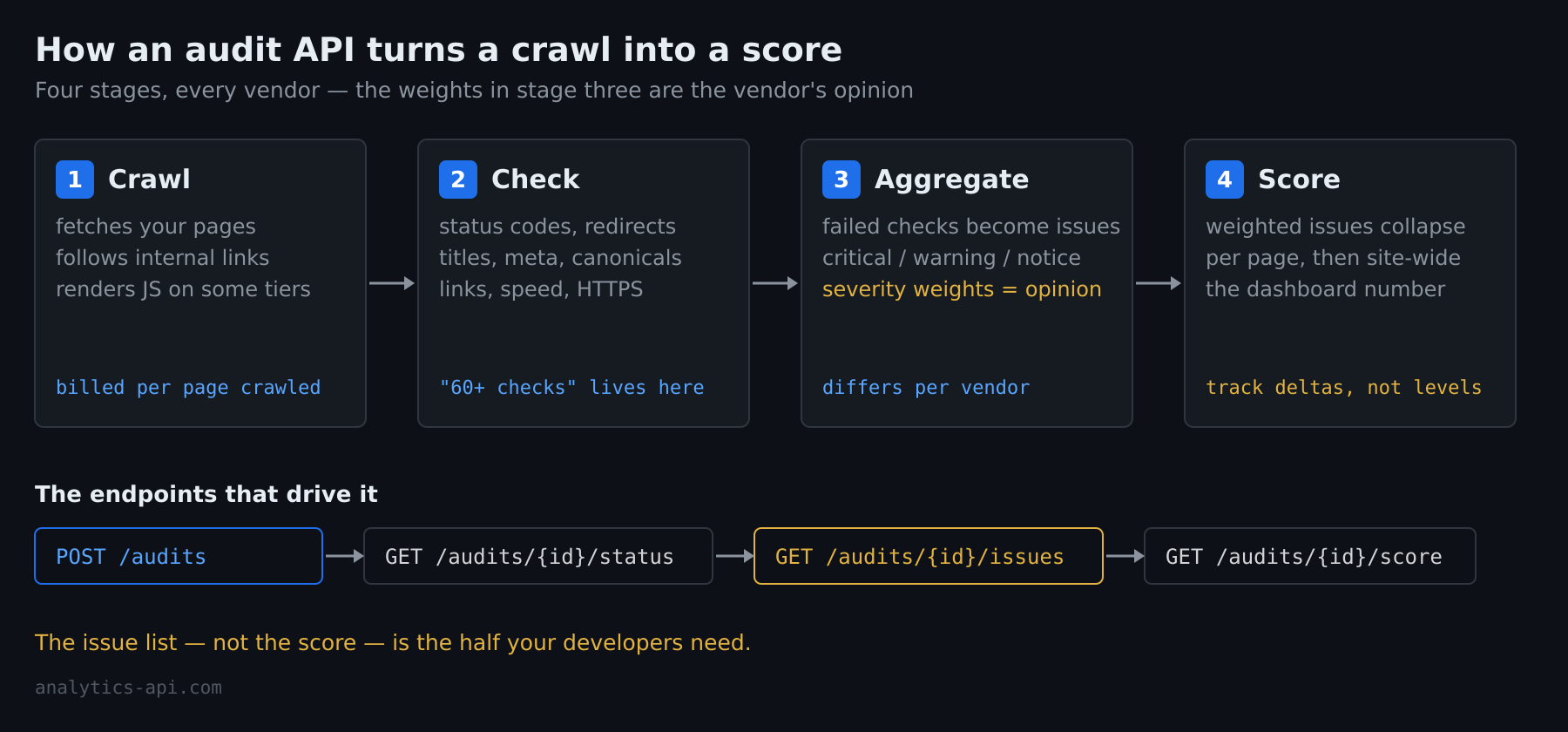
Behind every score sits the same four-stage pipeline, whichever vendor runs it:
- Crawl. You submit a domain or a URL list; the vendor’s crawler fetches your pages the way a search engine would — following links, respecting (or configurably ignoring) robots.txt, rendering JavaScript on the pricier tiers.
- Check. Each fetched page runs through a battery of tests: HTTP status codes, redirect chains, title and meta description presence and length, canonical tags, hreflang pairs, broken links, image alt attributes, page weight, mobile viewport, HTTPS and mixed content, structured data validity. Vendors advertise the count — “60+ checks”, “82 checks per URL” — and the marketing number mostly measures how finely they slice the same underlying categories.
- Aggregate. Failed checks become issues, issues get severity labels (critical / warning / notice is the common trio), and severities get weights.
- Score. The weighted results collapse into a per-page number, and the per-page numbers collapse into the site-wide one that ends up on the dashboard.
The API surface mirrors the pipeline. A typical integration starts an audit with a POST, polls a status endpoint while the crawl runs, then pulls three progressively deeper resources: the site score, the issue list grouped by check, and the affected-URL list per issue. That last resource is the one your developers actually need, and it is the one dashboard users never see.
Where the Score Comes From
There is no standard formula. Each vendor decides which checks exist, which severity each failure earns, and how severities weigh against each other. One tool treats a missing meta description as a warning, another as a notice; one weights site speed heavily, another barely counts it; JavaScript rendering differences mean two crawlers can disagree about what your page even contains. Run the same site through three audit APIs the same afternoon and three scores come back — routinely 15–20 points apart.
That is not a flaw in any one tool. The score is a vendor’s editorial opinion about severity, expressed as a number. It is consistent within the tool that produced it and meaningless across tools. The practical consequences:
- Never benchmark your score against a competitor’s score from a different tool. The comparison measures the tools, not the sites.
- Never average scores across vendors. An average of three opinions with three different scales is noise with extra steps.
- Track the delta, not the level, on one tool. A score that moves from 82 to 74 after a deploy is a signal worth investigating. The 82 itself never was.
- Expect recalibration. Vendors adjust weights and add checks; your score can move while your site does not. When I help teams set up score monitoring, we log the vendor’s changelog date next to every unexplained step in the trend line — it resolves most of the mysteries.
The Free Path: PageSpeed Insights and Lighthouse
Before paying for an audit API, know what Google gives away. The PageSpeed Insights API wraps Lighthouse and returns, per URL, category scores from 0 to 100 — performance, accessibility, best practices and an SEO category score — along with the individual audit results behind them. It is a real scoring API, it costs nothing, and the quota is generous enough for serious automation.
The honest caveat is scope. Lighthouse’s SEO category checks page-level table stakes: the page is crawlable, has a title and meta description, links are followable, the viewport is mobile-friendly, structured data parses. It runs one URL at a time and knows nothing about your site as a whole — no crawl, no duplicate-content detection, no orphan pages, no redirect-chain mapping, no internal-link graph. I run thousands of PageSpeed checks a month across client sites, and the pattern holds: PSI is excellent as a per-page regression gate and useless as a site audit. The two jobs need different tools.
A workable free-tier setup: PSI API on your money pages on a schedule (catching per-page regressions), plus a periodic manual crawl with a desktop tool for the site-level picture. The paid audit API earns its keep when you need the site-level picture continuously and programmatically.
Who Sells Site Audit APIs
The recurring names, with the one fact that most distinguishes each:
- Semrush Site Audit API — audit endpoints ride on the Projects API, so it fits teams already running Semrush projects; you trigger crawls and pull the issue snapshots the UI shows.
- SE Ranking Website Audit API — page-level technical metrics plus per-issue affected-URL lists, in the same API family as their ranking data.
- DataForSEO On-Page API — audit-as-a-service without a subscription UI attached; you bring your own storage and dashboards, it brings the crawler and checks.
- Apify SEO audit actors — crawls packaged as rentable cloud scrapers; the flexible choice when you want to modify what gets checked.
- Smaller single-purpose services (seoscoreapi.com and similar) — one endpoint, one URL in, checks and a score out; the fast way to embed a score into a product feature.
Pricing across the category is usage-based — page credits per crawl, or request quotas — and changes often enough that I will not print numbers here; check the vendor’s page the week you decide. The structural cost question is stable, though: audit APIs bill by pages crawled, so a 50,000-URL site on a weekly schedule costs two orders of magnitude more than a 500-URL site, whatever the vendor.
What to Automate with a Score API
The integrations that keep earning their maintenance cost, across the implementations I have seen:
- The trend line. One scheduled crawl per week, score and critical-issue count appended to a table you own. Ten minutes of setup, and “did the site get better this quarter” stops being a feeling.
- The deploy gate. Audit the staging URL set before release; block on new critical issues. This is where per-page APIs like PSI shine — fast, free, and per-URL.
- The regression alert. Diff this week’s issue list against last week’s; alert on new issues only. An alert that fires on the standing total gets muted within a month — the diff stays readable forever.
- Client reporting. Agencies pull score plus top issues per client into one document. Clients like the number; your team works the issue list; both audiences get served from one API call.
One thing I always tell clients: automate the collection, not the reaction. A pipeline that auto-files a ticket per issue produces four hundred tickets on day one and zero credibility on day two. Collect programmatically, triage like a human.
Reading the Response Without Getting Fooled
Three habits for consuming audit API output:
- Deduplicate by template. Nine hundred “missing meta description” issues are usually one template bug counted nine hundred times. Group affected URLs by path pattern before estimating effort — the issue count measures crawl breadth, not work remaining.
- Separate blocking from cosmetic. Vendor severity labels are a starting point, not a verdict. A “critical” mixed-content warning on an unlinked archive page matters less than a “warning”-level noindex on your best-selling category. Severity times traffic is the ranking that matters, and only you have the traffic half.
- Store snapshots, not just current state. Most audit APIs serve the latest crawl and a shallow history. If you want to prove the June migration caused the issue spike, you need your own append-only record — the same store-it-yourself rule that applies to ranking data applies here.
Frequently Asked Questions
Is there a free SEO score API?
Yes — the PageSpeed Insights API returns Lighthouse’s SEO category score per URL at no cost, with a workable quota. It checks page-level fundamentals only; site-level auditing (duplicate content, orphan pages, crawl mapping) needs a crawler-based API, and those are paid.
Why is my SEO score different in every tool?
Because the score is each vendor’s own weighting of their own check list, computed from their own crawler’s view of your site. There is no shared formula. Pick one tool for trend tracking and treat cross-tool differences as definitional, not diagnostic.
What is a good SEO score?
There is no threshold with meaning across sites or tools. A useful reframe: a good score is one that is not falling, on a tool you run consistently, with zero critical issues on pages that earn traffic. Chasing a specific number rewards fixing cosmetic issues on pages nobody visits.
Keep Reading
- The SEO API guide — the full map of what SEO APIs return
- SEO ranking APIs — position tracking programmatically
- Backlink APIs — link profiles at scale
- Building an SEO reporting workflow — joining search and analytics data into one report
// Alicia Bennett
Lead Web Analyst based in Toronto with 12+ years in digital analytics — privacy-first tracking, open-source tools, and the analytics API layer that sits under every dashboard.
More about the author →