Real-Time Analytics APIs: Streaming vs Polling
When a client asks me “can we see what’s happening on our site right now,” they picture a live ticker — events streaming in, counters ticking up, something that feels genuinely instant. What most analytics APIs actually deliver is something subtler: a snapshot that refreshes every 30 seconds, or a report that’s accurate as of two minutes ago. That gap between perception and reality matters a lot when you’re deciding how to build a real-time analytics API integration.
In this guide I’ll walk through what “real-time” actually means in analytics contexts, how polling and push-based streaming work, where each one fits, and how to make the right architectural call for your situation. I’ll be honest about the trade-offs — because most of the time, the pragmatic choice is simpler than you’d think.
What “Real-Time” Actually Means in Analytics
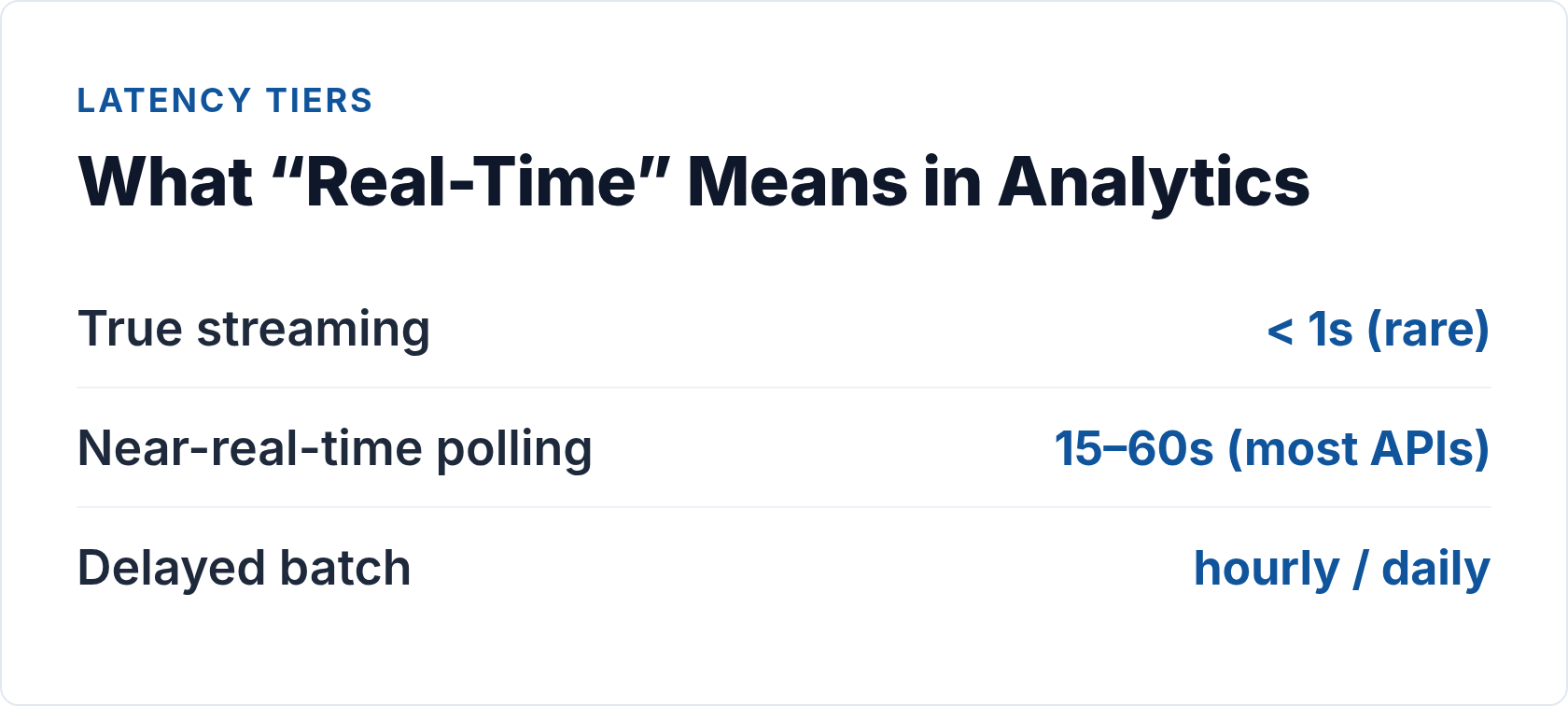
Real-time is one of those terms that gets stretched until it’s almost meaningless. In analytics, it usually describes one of three things:
- Sub-second streaming: Events arrive at a dashboard within milliseconds of occurring. True real-time. Rare in web analytics products.
- Near-real-time (polled): A report refreshes every 15–60 seconds by repeatedly querying an API. Feels live. This is what the vast majority of analytics “real-time” dashboards actually do.
- Delayed batch: Data is processed in batches — hourly, daily — before it appears in reports. Historical analytics. Not real-time at all, though still labeled that way in some platform UIs.
Knowing which of these a platform offers is the first step before you write a single line of integration code. Plausible’s Stats API, for instance, delivers current-day pageview counts that are genuinely fresh — but you’re polling that endpoint; Plausible isn’t pushing updates to you. Matomo’s real-time visitor log works the same way. Even the GA4 Data API’s “realtime” report is a polled resource, not a true data stream.
True event streaming — where the platform emits each event as it happens — typically requires dedicated infrastructure: webhooks, Server-Sent Events, or WebSockets. Most analytics SaaS products don’t expose that layer directly, though some event-collection and customer data platform tools do.
Polling: How It Works and When to Use It
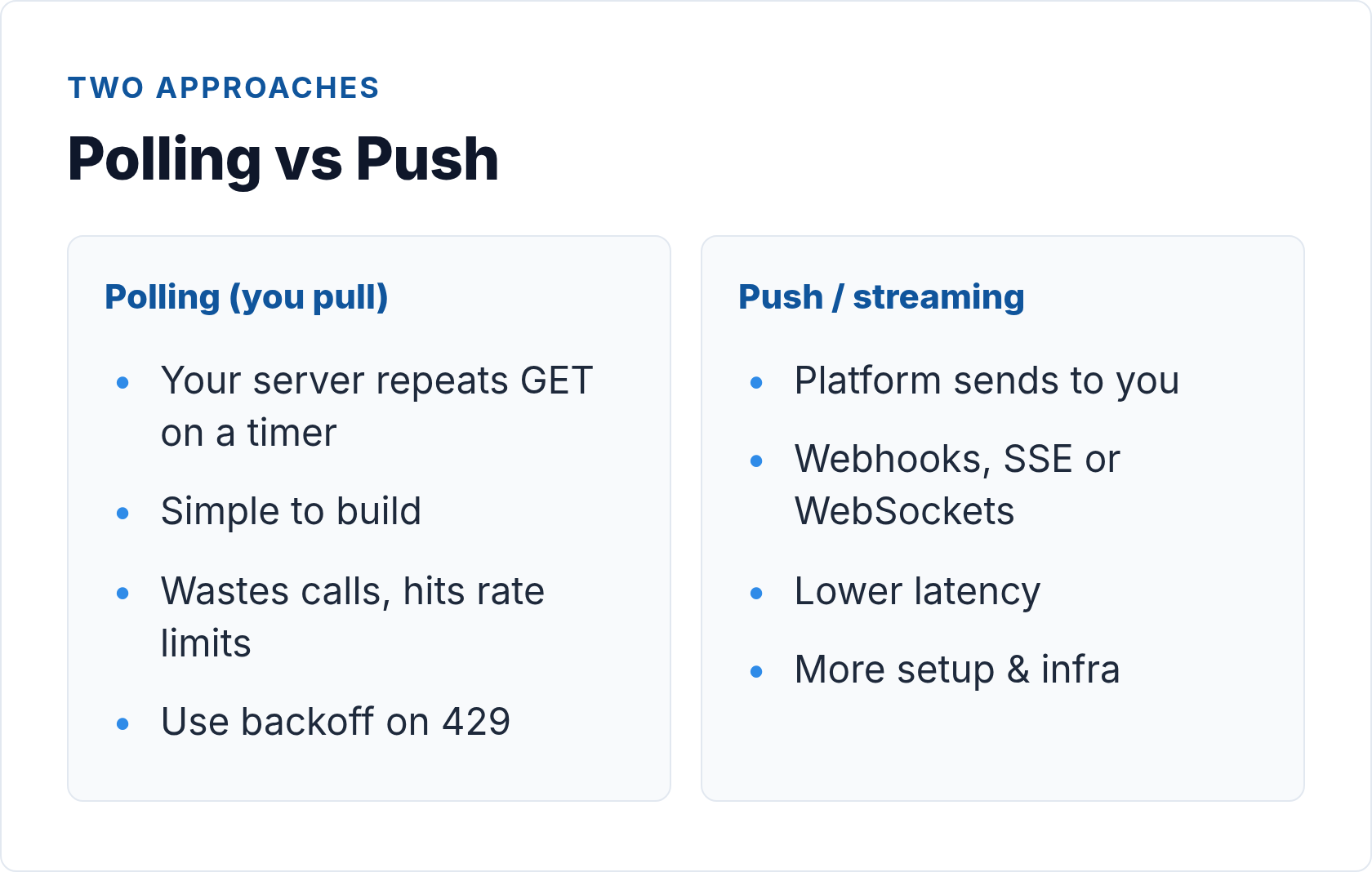
Polling is the simplest approach: your code fires an HTTP GET on a timer, receives the latest data, does something with it, waits, and repeats. Almost every analytics API supports this pattern because it maps directly to standard REST endpoints.
A Basic Polling Loop
// Node.js polling loop — Plausible Stats API
// Replace YOUR_SITE_ID and YOUR_API_KEY with real values

const POLL_INTERVAL_MS = 30_000; // 30 seconds
const API_BASE = 'https://plausible.io/api/v2/query';

async function fetchRealtimeStats(apiKey, siteId) {
  const body = {
    site_id: siteId,
    metrics: ['visitors', 'pageviews'],
    date_range: 'day',
  };

  const res = await fetch(API_BASE, {
    method: 'POST',
    headers: {
      'Authorization': `Bearer ${apiKey}`,
      'Content-Type': 'application/json',
    },
    body: JSON.stringify(body),
  });

  if (!res.ok) {
    throw new Error(`API error ${res.status}: ${await res.text()}`);
  }

  return res.json();
}

async function startPolling(apiKey, siteId) {
  let backoffMs = POLL_INTERVAL_MS;

  while (true) {
    try {
      const data = await fetchRealtimeStats(apiKey, siteId);
      console.log('Stats:', JSON.stringify(data.results, null, 2));
      backoffMs = POLL_INTERVAL_MS; // reset on success
    } catch (err) {
      console.error('Poll failed:', err.message);
      // exponential backoff on error, cap at 5 minutes
      backoffMs = Math.min(backoffMs * 2, 300_000);
    }

    await new Promise(resolve => setTimeout(resolve, backoffMs));
  }
}

startPolling(process.env.PLAUSIBLE_API_KEY, 'yourdomain.com');
A few things to notice in that code: the backoff on error is not optional. If the API returns a 429 (rate limit exceeded) or a transient 500 and you immediately retry at the same cadence, you’ll make the problem worse. Exponential backoff with a cap is the correct pattern.
Rate Limits You’ll Actually Hit
Every analytics API has limits. Plausible’s Stats API allows 600 requests per hour by default — that’s a request every six seconds, comfortably above any reasonable polling interval. Matomo’s limits depend on your hosting tier and server capacity. The GA4 Data API allows 200 requests per 100 seconds per project for the realtime method.
I’ve seen teams build dashboards that open a new polling connection for every browser tab a stakeholder has open. Twelve tabs, one dashboard — suddenly you’re firing twelve parallel polling loops at the same interval. Always centralize polling on your backend and push the result to connected clients via your own WebSocket or SSE layer. Don’t let browsers poll APIs directly.
Trade-offs of Polling
- Simple to implement — standard HTTP, works with every REST API
- Predictable quota usage — one request per interval, easy to model
- Stateless — each request is independent; failures don’t cascade
- Inherent latency — you always see data that’s up to one poll-interval old
- Wasted requests — if nothing changed, you’ve still consumed a request slot
For most analytics use cases — a live visitor count, a today-vs-yesterday comparison, a real-time conversion counter — polling every 30–60 seconds is more than adequate. Users don’t notice the difference between “truly live” and “refreshes every 30 seconds.”
Push and Streaming: Webhooks, SSE, and WebSockets
Push-based approaches flip the model: instead of you asking for data, the platform sends data to you when something happens. This is genuinely real-time, but it requires a different architecture.
Webhooks
Webhooks are HTTP POST requests sent by a platform to a URL you control, triggered by an event. A form submission, a payment, a signup — the platform fires a POST to your endpoint the moment it occurs.
Webhooks are the most common true-streaming mechanism in the analytics ecosystem, particularly for event-collection tools and CDPs (Customer Data Platforms) rather than reporting APIs. PostHog, for instance, supports webhook delivery for defined events. Many e-commerce and CRM platforms fire webhooks on conversion events that you then pipe into your analytics stack.
// Express.js webhook receiver
// Receives events posted by your analytics or CDP platform

const express = require('express');
const crypto = require('crypto');
const app = express();

app.use(express.json());

function verifySignature(payload, signature, secret) {
  const expected = crypto
    .createHmac('sha256', secret)
    .update(payload)
    .digest('hex');
  return crypto.timingSafeEqual(
    Buffer.from(`sha256=${expected}`),
    Buffer.from(signature)
  );
}

app.post('/webhook/analytics-event', (req, res) => {
  const rawBody = JSON.stringify(req.body);
  const signature = req.headers['x-webhook-signature'] || '';

  if (!verifySignature(rawBody, signature, process.env.WEBHOOK_SECRET)) {
    return res.status(401).json({ error: 'Invalid signature' });
  }

  // Always respond quickly — process async
  res.status(200).json({ received: true });

  // Process the event outside the request cycle
  setImmediate(() => handleAnalyticsEvent(req.body));
});

function handleAnalyticsEvent(event) {
  console.log('Event received:', event.type, event.properties);
  // Store to DB, update dashboard cache, trigger alerts, etc.
}

app.listen(3000);
Two things matter for reliable webhook handling: respond with a 200 immediately (before you process), and always verify the signature. Platforms will retry deliveries on non-200 responses, so a slow handler that times out will generate duplicate events. And without signature verification, your endpoint is open to spoofed payloads.
Server-Sent Events (SSE)
Server-Sent Events are a browser-native protocol where a server holds open an HTTP connection and streams text events down to the client. The client uses the EventSource API — supported in all modern browsers without any libraries.
SSE is one-directional (server to client), which makes it lighter than WebSockets and a natural fit for live dashboards where the browser only needs to receive updates. If you’re building your own analytics dashboard that aggregates polled API data and pushes it to browsers, SSE is the right tool between your backend and your frontend.
WebSockets
WebSockets open a persistent, bidirectional TCP connection. They’re the right choice when the client also needs to send data (interactive filters, real-time collaboration, chat). The WebSocket API is standard in browsers, but running WebSocket infrastructure at scale adds operational complexity most analytics teams don’t need.
I rarely recommend WebSockets for pure analytics dashboards. SSE handles the read-only streaming case with far less overhead. Use WebSockets when you genuinely need two-way communication.
Polling vs Streaming: A Direct Comparison
| Factor | Polling | Webhooks / SSE / WebSockets |
|---|---|---|
| Implementation complexity | Low — standard HTTP GET/POST | Medium–High — requires endpoint, queuing, retry logic |
| Latency | Up to one poll interval (15s–60s typical) | Near-zero (milliseconds after event) |
| Infrastructure required | None beyond your existing backend | Public HTTPS endpoint, possibly a queue (Redis/SQS) |
| Handling missed events | Built-in — next poll catches up | Must implement retry/replay logic yourself |
| Rate limit pressure | Predictable; one request per interval | Low (events push to you); API quota mostly not relevant |
| Suitable for reporting APIs | Yes — this is what they’re designed for | Rarely — most analytics APIs don’t offer push |
| Suitable for event collection | Works but feels wrong architecturally | Yes — natural fit for event-driven pipelines |
| Browser scaling concern | High — don’t poll from many tabs | Low — SSE connections are cheap and centralized |
Latency vs Cost: Getting the Balance Right
Reducing latency always costs something. Here’s how to think about the trade-off honestly.
A 30-second polling interval on Plausible’s API costs you 120 requests per hour. At the 600 requests/hour limit, you have headroom for four concurrent dashboard users polling independently — or one backend polling loop serving a hundred users via SSE. The math forces the right architecture.
True streaming infrastructure — a WebSocket server, a message queue, a webhook delivery system — costs engineering time to build and ops time to run. For a team of five looking at a live visitor count, that investment doesn’t pay off. For a fintech product where a real-time fraud signal needs to route through an analytics pipeline within 500ms, it absolutely does.
One thing I always tell clients: measure your actual latency requirement, don’t assume it. I’ve seen teams build WebSocket streaming infrastructure because “we need real-time” — and when we dug into the use case, stakeholders were checking the dashboard twice a day. A 60-second polling interval would have been invisible to them and saved three weeks of engineering work.
The guiding question is: what is the cost of a 30-second delay in this specific context? If the answer is “nothing material,” polling is the right choice. If the answer is “a customer sees an incorrect price” or “a fraud transaction goes undetected,” you need proper streaming infrastructure.
Choosing the Right Approach for Your Use Case
Across dozens of implementations I’ve worked on, a few patterns come up consistently:
Use polling when:
- You’re consuming a standard analytics reporting API (Plausible, Matomo, Umami, GA4 Data API)
- Stakeholders need a live dashboard that refreshes every 30–60 seconds
- Your team doesn’t have infrastructure for webhook endpoints or streaming servers
- You’re prototyping — polling is fast to build and easy to reason about
Use webhooks when:
- The source platform supports them and you need per-event granularity
- You’re ingesting conversion events, form submissions, or payment events into your analytics pipeline
- You need to trigger downstream actions immediately on specific event types
Use SSE when:
- You’re building a custom dashboard that aggregates data and needs to push updates to browsers efficiently
- You want to centralize polling on your backend and fan out to many clients without multiplying API requests
Use WebSockets when:
- You genuinely need bidirectional real-time communication between client and server
- You’re building collaborative tooling on top of analytics data, not just displaying it
For context on how event architecture feeds into these decisions, the deep-dive on event tracking architecture and designing a scalable data layer covers the upstream collection side in detail — worth reading before you decide on a streaming approach, because the right streaming architecture often depends on how events are captured in the first place.
Practical Implementation Notes
A few things that don’t fit neatly into categories but come up on every project:
Always build in error handling from day one. A polling loop without backoff will hammer a rate-limited API and get your key suspended. A webhook receiver without idempotency handling will double-count events on retries. These aren’t edge cases — they’re the normal failure modes of production systems.
Cache aggressively at your layer. If you’re serving a dashboard to ten users, poll once and serve the cached result to all ten. Check the stale-while-revalidate pattern from web.dev — it applies to API caching as much as it does to browser resources.
Validate what you receive. Real-time data streams are especially prone to partial data, null values on low-traffic pages, and sampling artifacts. Check response schemas, handle nulls explicitly, and flag anomalies rather than silently passing bad data downstream. This connects directly to the broader challenge of automated reporting workflows from raw data to stakeholder insights — validation is the bridge between raw API output and something a stakeholder can trust.
Separate concerns cleanly. Your polling loop should do one thing: fetch and cache. Your SSE or WebSocket layer should do one thing: push cached data to clients. Your processing logic should be a third thing. Mixing them together is how you end up with a brittle, hard-to-debug system.
Think about reconnection. SSE connections drop. Webhook endpoints go offline for maintenance. Polling loops get restarted. Design with recovery in mind: store a “last successful fetch” timestamp, implement cursor-based catch-up for webhook event streams, and use the EventSource reconnection features built into the SSE spec.
If you’re building cross-channel analytics that pulls from multiple platforms simultaneously, the coordination overhead multiplies. The cross-channel analytics implementation guide covers the orchestration patterns for managing multiple API connections without them interfering with each other’s rate limits or error states.
The Honest Bottom Line
Most teams building on analytics APIs don’t need true streaming. They need a polling loop with good error handling, a backend cache, and a clean way to push updates to a browser — SSE handles that last step elegantly. That architecture is reliable, cheap to operate, and fast enough for every real-time use case I’ve encountered in web analytics.
Reserve webhooks and WebSockets for situations where per-event immediacy actually changes behavior: fraud detection, real-time personalization, event-driven pipeline triggers. For a live visitor counter or a today-vs-yesterday revenue dashboard, 30-second polling is genuinely indistinguishable from “real-time” to the humans looking at the screen.
Build the simple thing first. Measure whether the latency matters. Upgrade only when you have evidence that you need to.
// Alicia Bennett
Lead Web Analyst based in Toronto with 12+ years in digital analytics — privacy-first tracking, open-source tools, and the analytics API layer that sits under every dashboard.
More about the author →