Matomo Reporting API: A Developer’s Guide
Most analytics platforms give you a dashboard. Matomo gives you an API. And if you’ve ever needed to pull visit data into a custom report, feed metrics into a business intelligence tool, or automate a stakeholder email, the Matomo Reporting API is where your real work begins.
I’ve integrated Matomo’s API across dozens of implementations — from small self-hosted setups pulling daily summaries to larger pipelines feeding warehouse tables. The API is remarkably consistent once you understand its structure. This guide covers everything you need: how authentication works, the unified endpoint pattern, real request examples, response formats, pagination, segments, and the security practices that keep your token out of server logs.
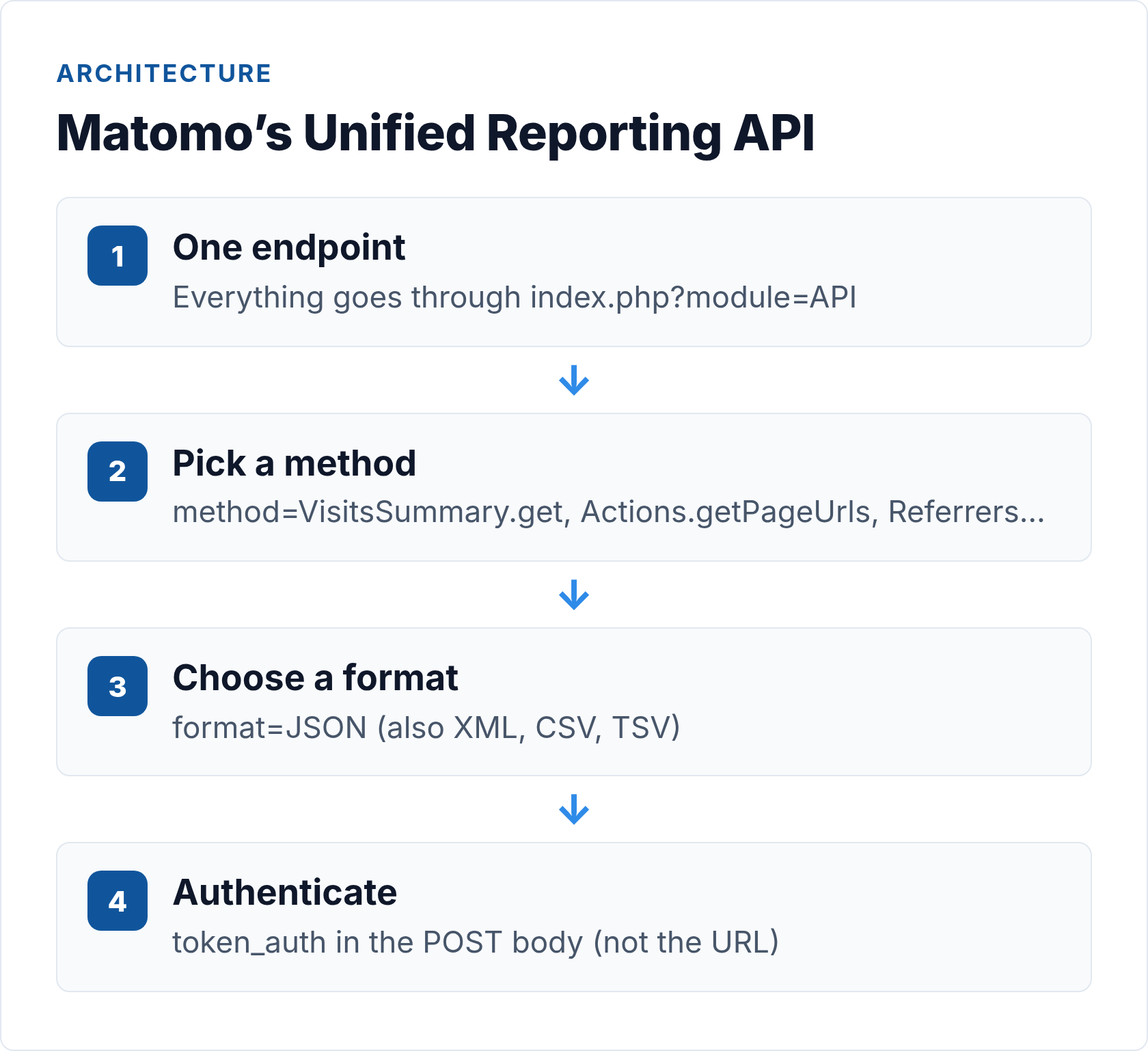
What the Matomo Reporting API Actually Is
The Matomo Reporting API is a single, unified HTTP interface that exposes almost everything Matomo can compute — visit counts, page URLs, referrers, events, goals, e-commerce data, and more. Every metric you see in the Matomo UI is available through this API. That’s not an exaggeration: the UI itself calls the same API under the hood.
The design philosophy is module-based. Matomo organizes its data into modules like VisitsSummary, Actions, Referrers, Goals, and Events. Each module exposes methods. You call Module.method through one endpoint, pass your parameters, and get structured data back. Once you learn the pattern, you can reach any part of the API without relearning anything.
This is different from most analytics APIs you’ll encounter. Unlike the GA4 Data API, which uses a separate report-building POST body, Matomo keeps every request structurally identical. Different data, same shape.
Step 1: Get Your token_auth
Every Matomo API request requires a token_auth parameter. This is a 32-character hex string tied to a Matomo user account. Think of it as an API key — whoever holds it has the same data access as that user.
To find yours:
- Log into your Matomo instance
- Click your username in the top right → Personal settings
- Scroll to the API Authentication Token section
- Copy the token shown there
If you’re using Matomo for WordPress (the plugin that embeds Matomo directly into a WordPress install), authentication works differently. Instead of the standard hex token, you pass token_auth as username:application_password — a WordPress application password generated under that user’s profile. The format is literally the username, a colon, and the app password with spaces removed.
One important note: treat this token like a password. It gives API callers access to your analytics data. Store it in environment variables or a secrets manager — never hardcode it in a script you’ll commit to version control.
Step 2: Understand the Unified Endpoint
All Matomo Reporting API requests go to one URL:
https://your-matomo-instance.com/index.php?module=API&method=Module.action&format=JSON
The three core query parameters that shape every request:
| Parameter | Description | Example values |
|---|---|---|
module |
Always API |
API |
method |
The module and action you’re calling | VisitsSummary.get, Actions.getPageUrls |
format |
Response format | JSON, XML, CSV, TSV |
Then you add data-scoping parameters:
| Parameter | Description | Example |
|---|---|---|
idSite |
Your site ID (integer from Matomo) | 1 |
period |
Time unit for the report | day, week, month, year, range |
date |
The date or range | today, 2026-06-01, 2026-05-01,2026-05-31 |
token_auth |
Your authentication token | abc123... |
The period and date combination controls what timeframe the report covers. period=month&date=last3 returns the last three complete months. period=range&date=2026-05-01,2026-05-31 returns a custom range aggregated as a single row.
Step 3: Make Your First Requests
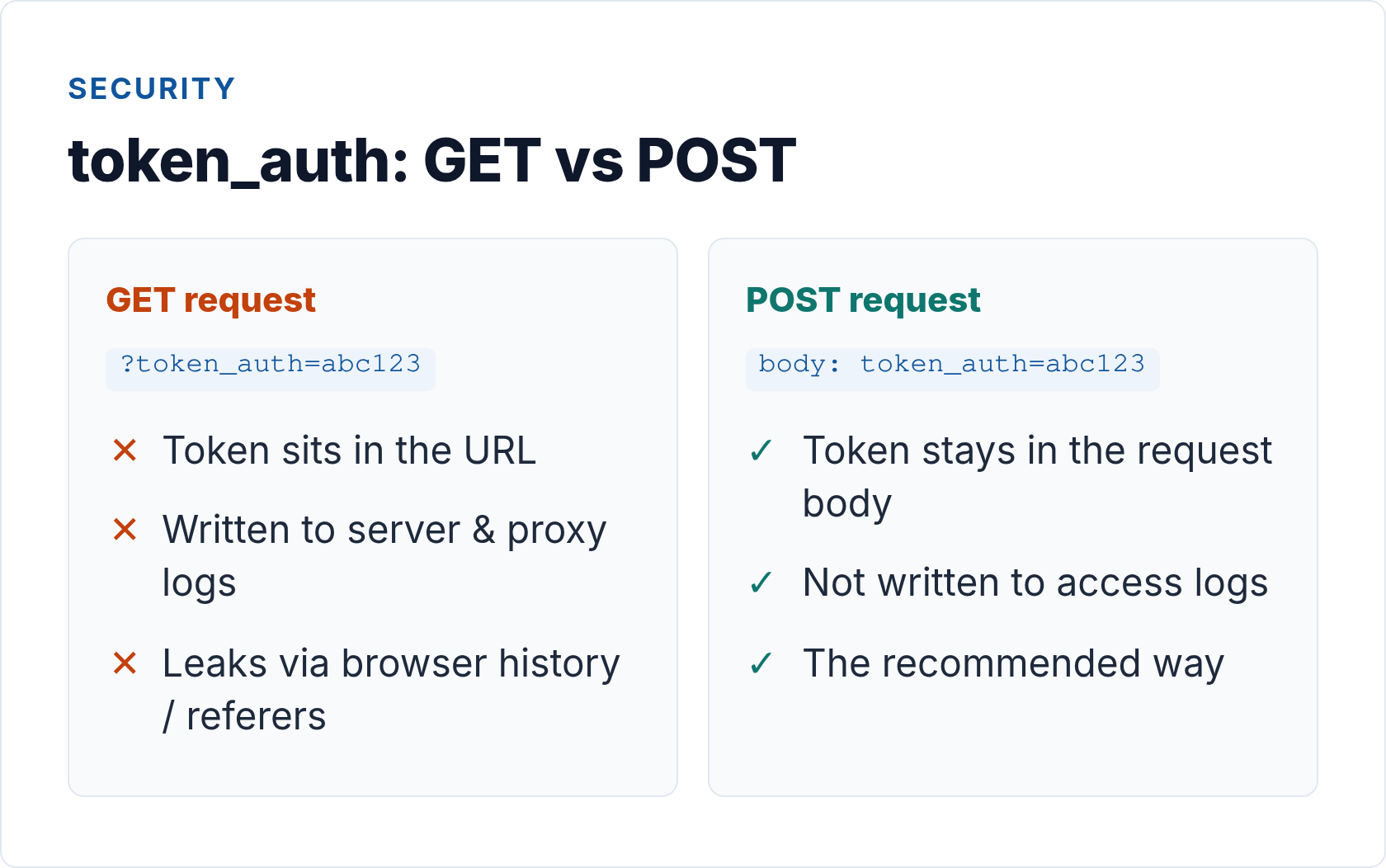
Prefer POST over GET for all Matomo API calls. With a GET request, your token_auth appears in the URL — which means it lands in web server access logs, browser history, and anywhere else URLs get cached. POST keeps the token in the request body where it belongs.
VisitsSummary.get — Your Daily Dashboard
This is the method I reach for first with any new integration. It returns the core visit metrics for a site and period: visits, unique visitors, pageviews, bounce rate, and average session duration.
POST https://your-matomo-instance.com/index.php
Content-Type: application/x-www-form-urlencoded

module=API
&method=VisitsSummary.get
&idSite=1
&period=month
&date=last1
&format=JSON
&token_auth=YOUR_TOKEN_HERE
Using curl:
curl -X POST "https://your-matomo-instance.com/index.php" \
  --data-urlencode "module=API" \
  --data-urlencode "method=VisitsSummary.get" \
  --data-urlencode "idSite=1" \
  --data-urlencode "period=month" \
  --data-urlencode "date=last1" \
  --data-urlencode "format=JSON" \
  --data-urlencode "token_auth=YOUR_TOKEN_HERE"
A successful response looks like this:
{
  "nb_visits": 12483,
  "nb_uniq_visitors": 9201,
  "nb_actions": 38750,
  "nb_visits_converted": 342,
  "bounce_count": 5814,
  "sum_visit_length": 18204300,
  "max_actions": 87,
  "bounce_rate": "46%",
  "nb_actions_per_visit": 3.1,
  "avg_time_on_site": 145
}
Note that avg_time_on_site is in seconds. nb_actions counts pageviews plus events combined.
Actions.getPageUrls — Top Pages by Traffic
For page-level data, Actions.getPageUrls returns a list of URLs with their metrics. This is the equivalent of a top-pages report.
curl -X POST "https://your-matomo-instance.com/index.php" \
  --data-urlencode "module=API" \
  --data-urlencode "method=Actions.getPageUrls" \
  --data-urlencode "idSite=1" \
  --data-urlencode "period=week" \
  --data-urlencode "date=last1" \
  --data-urlencode "format=JSON" \
  --data-urlencode "filter_limit=25" \
  --data-urlencode "token_auth=YOUR_TOKEN_HERE"
The response is an array of objects, one per URL:
[
  {
    "label": "/blog/matomo-setup/",
    "nb_visits": 1842,
    "nb_hits": 2109,
    "sum_time_spent": 284310,
    "entry_nb_visits": 1204,
    "exit_nb_visits": 987,
    "bounce_rate": "38%",
    "avg_time_on_page": 154,
    "exit_rate": "54%"
  },
  ...
]
The label field is the URL path. nb_hits is pageviews; nb_visits is visits that included this page. They’ll differ because some visitors view the same page multiple times in a session.
Step 4: Work with Response Formats and Pagination
Matomo supports four response formats. JSON is the default for programmatic use, but CSV is useful when you want to pipe data directly into a spreadsheet or a simple file-based pipeline.
| Format | Best for | Content-Type returned |
|---|---|---|
JSON |
Application integration, dashboards | application/json |
XML |
Legacy systems, SOAP-adjacent pipelines | text/xml |
CSV |
Spreadsheet import, file-based ETL | text/csv |
TSV |
Tab-delimited pipelines | text/tab-separated-values |
Pagination
By default, most Matomo reports return a limited number of rows. Control pagination with two parameters:
filter_limit— how many rows to return (use-1for all rows, with caution on large sites)filter_offset— row offset for paging through results
curl -X POST "https://your-matomo-instance.com/index.php" \
  --data-urlencode "module=API" \
  --data-urlencode "method=Actions.getPageUrls" \
  --data-urlencode "idSite=1" \
  --data-urlencode "period=month" \
  --data-urlencode "date=last1" \
  --data-urlencode "format=JSON" \
  --data-urlencode "filter_limit=100" \
  --data-urlencode "filter_offset=0" \
  --data-urlencode "token_auth=YOUR_TOKEN_HERE"
On high-traffic sites, requesting all rows with filter_limit=-1 can return tens of thousands of records and slow your Matomo server significantly. Page through in batches of 200-500 rows for large datasets. Always validate the response structure — check for nulls and unexpected field types before writing to a downstream system. I’ve seen poorly handled API responses silently corrupt reporting pipelines when a field returns null instead of 0. For a systematic approach to catching these issues, see our guide on analytics data validation and tracking error detection.
Requesting Multiple Date Ranges
Add period=range with a comma-separated date pair to aggregate over a custom window:
period=range&date=2026-05-01,2026-05-31
Or use relative shortcuts: date=last30 with period=day returns 30 individual day rows. Useful for building trend charts without making 30 separate API calls.
Step 5: Filter with Segments
Segments let you restrict any API report to a subset of visits. They work on almost every Matomo method, which makes them powerful for audience-specific reporting without building separate sites in Matomo.
A segment is a URL-encoded string passed as the segment parameter. The syntax is dimensionName==value for exact matches, with AND and OR operators for compound conditions.
Examples:
# Visits from the United States only
segment=countryCode%3D%3DUS

# Visits from organic search
segment=referrerType%3D%3Dsearch

# Mobile visits from organic search (AND condition)
segment=deviceType%3D%3Dsmartphone%3BreferrerType%3D%3Dsearch
In an actual curl POST, pass it as a form field:
curl -X POST "https://your-matomo-instance.com/index.php" \
  --data-urlencode "module=API" \
  --data-urlencode "method=VisitsSummary.get" \
  --data-urlencode "idSite=1" \
  --data-urlencode "period=month" \
  --data-urlencode "date=last1" \
  --data-urlencode "format=JSON" \
  --data-urlencode "segment=referrerType==search" \
  --data-urlencode "token_auth=YOUR_TOKEN_HERE"
The full list of available segment dimensions is documented in the Matomo segmentation reference. The breadth is impressive — you can segment on country, device type, browser, referrer type, custom dimensions, goals completed, and dozens more.
Segments that need to be computed on-the-fly (rather than from pre-aggregated data) will be slower. For recurring reports, consider building automated reporting workflows that pre-segment during off-peak hours rather than at request time.
Step 6: Security — Keep the Token Off the Wire
I want to be direct about something I see get wrong constantly: your token_auth must never appear in a client-side context. Not in JavaScript. Not in a public URL. Not in a template variable that renders to the browser.
The token carries the same access level as the Matomo user it belongs to. If it leaks, anyone who finds it can export your full analytics history. A few non-negotiable practices:
- Always POST, never GET — GET requests embed the token in the URL, which gets logged by your web server, your CDN, and any reverse proxy in the chain
- Store tokens in environment variables — not in code, not in config files committed to version control
- Create a read-only Matomo user for API access — don’t use your admin account’s token for automated pipelines
- Rotate tokens periodically — Matomo lets you generate a new token; update your pipelines after rotation
- Make API calls server-side only — if you’re building a dashboard, your server fetches from Matomo and serves the result; the browser never touches the Matomo API directly
If you need to expose analytics data publicly (a public traffic counter, for example), use Matomo’s anonymous user token — a special token_auth=anonymous that only works if you’ve explicitly enabled it and configured what anonymous access can see. Don’t use your real token as a shortcut.
Matomo’s privacy-first design also extends to the data itself: since you’re self-hosting, your analytics data never leaves your infrastructure. That’s a meaningful difference from proprietary platforms. If you’re still evaluating whether the privacy model fits your use case, our breakdown of privacy-first analytics vs. Google Analytics covers the practical data-quality benefits in detail.
Common Methods Reference
Here’s a quick-reference table of the methods I reach for most often across client integrations:
| Method | What it returns | Key optional params |
|---|---|---|
VisitsSummary.get |
Visits, pageviews, bounce rate, avg session | segment |
Actions.getPageUrls |
Top pages by visits and pageviews | filter_limit, filter_offset, flat |
Referrers.getAll |
Traffic by source type (search, direct, etc.) | segment |
Referrers.getSearchEngines |
Organic traffic by search engine | segment |
Goals.get |
Goal conversions and revenue | idGoal, segment |
Events.getCategory |
Event categories with hit counts | filter_limit, segment |
DevicesDetection.getType |
Visits by device type | segment |
UserCountry.getCountry |
Visits by country | filter_limit |
VisitFrequency.get |
New vs. returning visitor breakdown | segment |
API.getReportMetadata |
Discover all available reports and their params | apiModule |
The API.getReportMetadata method is useful when you’re exploring a new Matomo install. Call it without parameters and it returns a complete list of every method available on that instance, including those added by plugins. The full Matomo Reporting API reference documents every parameter for each method in detail.
Troubleshooting Common Issues
In my experience, most Matomo API problems fall into a small set of categories.
401 or “You can’t access this resource” — your token_auth is wrong, expired, or the user doesn’t have access to that idSite. Double-check the token in Matomo personal settings. For Matomo for WordPress, confirm you’re passing username:app_password exactly — spaces in the application password should be included as-is (WordPress generates them with spaces).
Empty response or {"result":"error"} — check the message field in the error response. Common causes: invalid idSite, unsupported period/date combination, or calling a method that requires a plugin that isn’t installed.
Slow responses on large date ranges — Matomo pre-aggregates data by day, week, and month. Requesting period=range for a wide window forces on-the-fly computation. Use period=month for large ranges and aggregate on your side when possible. The Matomo token_auth FAQ and general troubleshooting documentation cover authentication edge cases if you’re hitting persistent issues.
Data not matching the UI — Matomo’s UI applies some default filters (minimum visit threshold for some reports). Call API.getReportMetadata for the method you’re using and check if there are default filter_* parameters applied. You may need to pass filter_limit=-1 and filter_offset=0 explicitly to match UI totals.
The Matomo Reporting API’s consistency is its real strength. One endpoint, one authentication pattern, one response format convention — once you understand the structure, pulling any metric from your Matomo instance becomes a question of finding the right method name rather than learning a new API shape. That reliability is what makes it worth building proper pipelines around, rather than manual exports.
// Alicia Bennett
Lead Web Analyst based in Toronto with 12+ years in digital analytics — privacy-first tracking, open-source tools, and the analytics API layer that sits under every dashboard.
More about the author →